
 GROWTH GUIDE
Yelp Reviews for Business: Your 30-Day Action Plan
To control Yelp reviews for your business, claim and verify your Yelp Business account today, set up daily monitoring, respond to every review within 24 hours, request reviews ethically, and centralize everything with a tool like Service Grower. According to Shopify’s review management guide, treating review management as an ongoing daily function, not a one-time task, is what separates businesses that build trust from those that lose it quietly.
Start here (takes 15 minutes or less):
- Claim and verify your listing at Yelp for Business (biz.yelp.com)
- Enable email and push notifications for every new review
- Set a team rule: respond to all reviews within 24 hours
- Draft one response template for 5-star and one for 1-star reviews
- Begin ethical review requests at your next customer touchpoint
- Sign up for a Service Grower trial to centralize alerts and responses
Key Takeaways
Consistent, policy-compliant Yelp review management — claim your profile, respond within 24 hours, request reviews ethically, and track monthly KPIs — is the most direct path to stronger local visibility and customer trust.
| Point | Details |
|---|---|
| Claim and complete your profile | A verified, fully filled Yelp listing is the prerequisite for everything else. |
| Respond within 24 hours | Many shoppers are influenced by negative reviews; a fast, personal reply rebuilds trust publicly. |
| Ask ethically, not selectively | No incentives, no review-gating — a general post-service ask via email, SMS, or QR code is compliant. |
| Track five KPIs monthly | Average rating, review velocity, response rate, response time, and sentiment trend show whether your program is working. |
| Centralize with Service Grower | One inbox, automated requests, and GrowthView analytics replace manual tracking across multiple platforms. |
Table of Contents
- How do you claim and optimize your Yelp Business account?
- How to monitor Yelp reviews effectively every day
- How should you respond to Yelp reviews — templates for every star rating
- What does Yelp’s policy allow when asking for reviews?
- How to turn Yelp reviews into marketing assets
- What metrics should you track to improve your Yelp ratings?
- Why centralizing Yelp review management with Service Grower saves time
- Your 30-day Yelp review management checklist
- Why consistent review management wins more local customers
- One platform to run your entire Yelp review workflow
- Sources
How do you claim and optimize your Yelp Business account?
A complete, verified profile is the foundation. Yelp won’t surface an incomplete listing as confidently, and customers who land on a thin profile often bounce.
- Go to biz.yelp.com and search for your business name. If it exists, claim it. If not, create it.
- Verify ownership by phone or postcard (phone is faster — usually same day).
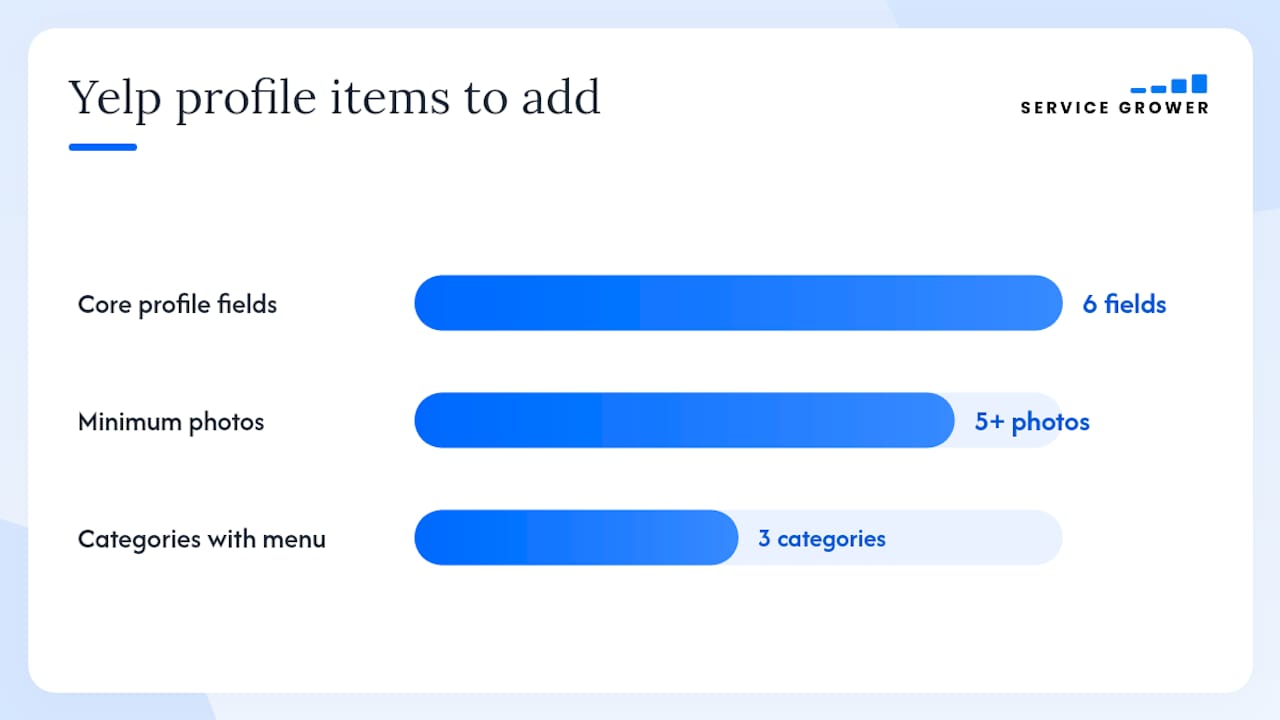
- Fill every core field: legal business name, street address, phone number, website URL, business hours, and the most accurate category.
- Upload at least five photos — exterior, interior, staff at work, and your best product or service shot.
- Add a service menu or highlights section if Yelp offers it for your category (restaurants, salons, and home services all have this).
- If verification stalls, contact Yelp Business Support directly through the owner dashboard and document your proof of ownership (utility bill, business license) before you call.
Pro Tip: Fill out the “From the Business” section in your profile. It’s the one place Yelp lets you speak directly to potential customers before they read a single review — use it to state your specialty and what makes your service worth choosing.
How to monitor Yelp reviews effectively every day
Daily monitoring is not optional if you care about local rankings. Review recency is a ranking signal, and a 1-star review sitting unanswered for a week tells every future reader that no one is home.
A practical cadence:
- Morning check (5 minutes): Log into Yelp for Business or your centralized dashboard and scan for any new reviews from the past 24 hours.
- Immediate alert rule: Configure Yelp’s native email notifications so that 1-star and 2-star reviews trigger an alert the moment they post — not in a daily digest.
- Weekly trend scan: Every Monday, look at your average rating, the number of new reviews, and any recurring complaints.
What to actually read in a review: the specific complaint or compliment, any staff name mentioned, the date of the visit, and the transaction type. These details tell you whether the issue is a one-off or a pattern. Anything involving a safety concern, a legal claim, or a named employee should be escalated to a manager before you respond.
Centralizing reviews into one dashboard reduces missed responses and makes it far easier to spot patterns across platforms — including Facebook reviews for business alongside Yelp.
Pro Tip: Set a phone notification, not just email. Email digests get buried. A push notification for a new 1-star review means you can respond before the reviewer’s frustration compounds.
How should you respond to Yelp reviews — templates for every star rating
Inc. reports that Many shoppers are influenced by negative reviews — and a well-written public reply often does more for your reputation than the original review itself. Respond publicly within 24–48 hours. Keep replies under 100 words. Be personal, not scripted.
5-star reply: 4-star reply: 3-star reply: 2-star reply: 1-star reply: Google’s community guidance applies equally to Yelp: keep replies brief, personalize every one, stay professional, and move complex matters offline. These same principles apply across all business review sites.
Avoid copy-paste replies. Reputation guides recommend staying under roughly 100 words and mirroring positive tone on good reviews rather than matching anger on negative ones.
Pro Tip: Save every response you write in a shared doc. Over time, you’ll build a library of real, tested language — and new staff can learn your tone without guessing.
What does Yelp’s policy allow when asking for reviews?
Yelp’s review guidelines are stricter than most platforms. The short version: you can ask customers to check you out on Yelp, but you cannot ask them to leave a positive review, offer any reward for a review, or selectively solicit only happy customers.
What Yelp allows:
- A general “Find us on Yelp” mention in post-service emails or on receipts
- A QR code on your counter or invoice that links to your Yelp profile
- An in-person mention after a completed service (“We’d love your feedback on Yelp”)
What Yelp prohibits (and the FTC also flags):
- Offering discounts, gifts, or any incentive in exchange for a review
- Review-gating (asking customers how they feel and only directing happy ones to Yelp)
- Asking a reviewer to change or remove a negative review in exchange for compensation
If a customer volunteers to update a negative review after you’ve resolved their issue, that’s fine — as long as you didn’t condition the resolution on the update. Document the resolution separately.
Timing matters. The best moment to mention Yelp is right after a completed service, while the experience is fresh. Most satisfied customers won’t leave a review unless asked — a brief, genuine ask at checkout or in a follow-up SMS converts far better than a link buried in a newsletter.
How to turn Yelp reviews into marketing assets
Reviews are content. Once you have them, put them to work.
- Website testimonials: Yelp’s brand guidelines allow you to quote reviews on your site with proper attribution. Pull your three strongest and add them to your homepage or a dedicated testimonials section.
- Social proof posts: Screenshot a 5-star review (with the reviewer’s display name visible) and post it to your social channels. Add a brief caption about the service mentioned.
- Local landing pages: If you serve multiple neighborhoods, a short review snippet referencing a specific area adds geographic relevance to that page.
- Operational feedback loop: When three or more reviews mention the same issue — wait times, a specific staff member, a product quality problem — that’s a process signal, not just a complaint. Log it, assign an owner, and close the loop within two weeks.
Customer reviews drive measurable purchase decisions — surfacing them prominently on your site and in social channels puts that influence where new prospects can see it before they ever reach Yelp.
Pro Tip: Never fabricate or paraphrase a review when quoting it publicly. Use the exact text, attribute it to Yelp, and link back to your profile. Accuracy protects you legally and builds more trust than a polished fake ever could.
What metrics should you track to improve your Yelp ratings?
Track these five KPIs monthly. They tell you whether your review program is working or stalling.
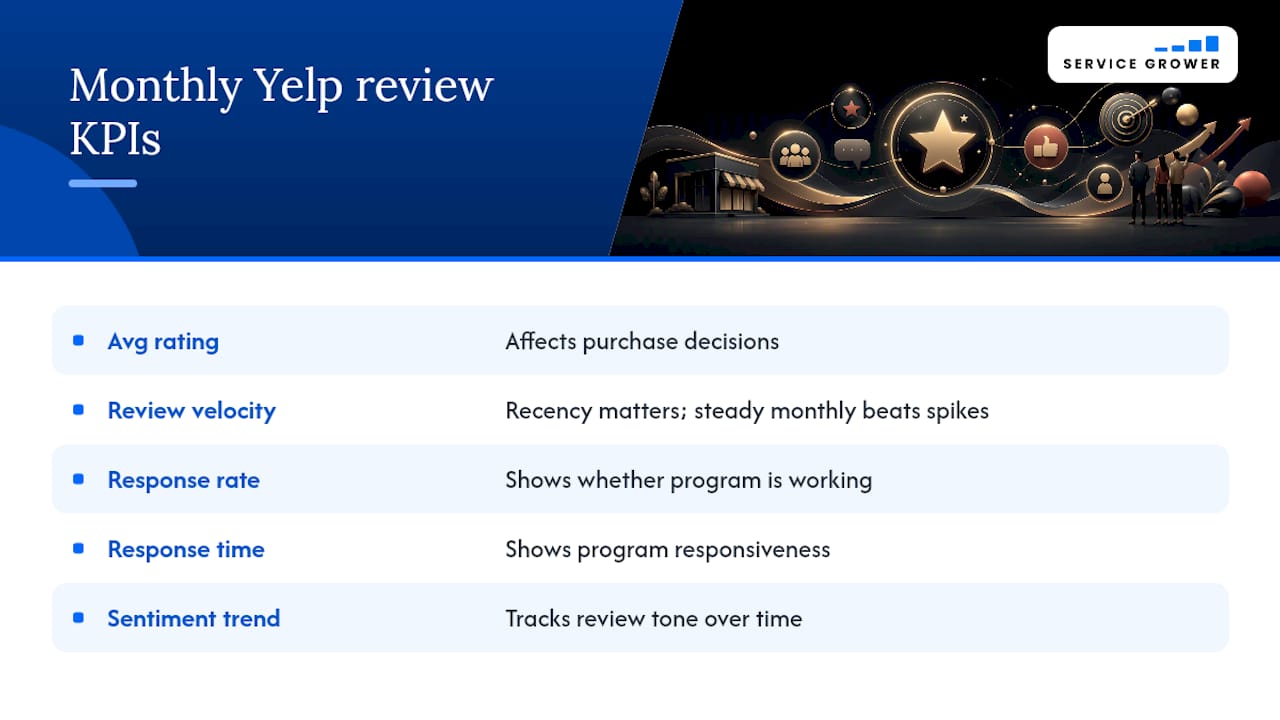
DigiWOM notes that fewer than 10 reviews looks unreliable to most consumers, 25–50 provides credibility, and 100 or more is strong social proof. Recency matters more than total count for local search visibility — a steady monthly velocity beats a one-time spike every time.
Reviews influence purchase decisions across channels, so these numbers have real revenue implications beyond just your Yelp profile.
Why centralizing Yelp review management with Service Grower saves time
A repeatable workflow beats good intentions. Here’s the compact version:
- Capture transaction → trigger an automated, policy-compliant review request via email or SMS
- Daily alert → review new feedback in one centralized inbox
- First response within 24 hours → use saved templates, personalize, post
- Escalate and log → flag complaints needing follow-up, assign to a team member, document resolution
- Monthly report → pull KPIs from your dashboard and adjust messaging
Service Grower maps directly to each step. AnswerReady sites surface your reviews in local and AI search results. The centralized inbox pulls Yelp and other platforms into one place. GrowthView analytics tracks your KPIs without manual spreadsheets.
| Workflow step | Service Grower feature |
|---|---|
| Automated review requests | SmartRequest forms |
| Centralized inbox | Multi-platform review dashboard |
| Response templates | Saved reply library |
| KPI tracking | GrowthView analytics |
Move from manual to automated tooling when you hit any of these triggers: you’re managing more than three review platforms, you have more than one location, or you’re receiving more than 50 reviews per month.
Pro Tip: Designate one person as the daily review owner — even if that’s you. Shared responsibility usually means no one checks. One owner, one inbox, one daily habit.
Your 30-day Yelp review management checklist
Week 1: Foundation
- Claim and verify your Yelp Business listing
- Complete every profile field (name, address, phone, hours, photos, categories)
- Enable email and push notifications for all new reviews
- Draft response templates for 5-star and 1-star reviews
- Document proof of ownership and save it in a shared folder
Week 2: Engagement
- Begin ethical review requests at each customer touchpoint (email, SMS, receipt QR code)
- Respond to every incoming review within 24 hours using your templates
- Brief any staff who interact with customers on your response tone and Yelp policy rules
Week 3: Centralize and measure
- Set up Service Grower to centralize your review inbox and automate requests
- Build your KPI dashboard (average rating, velocity, response rate, response time)
- Run your first weekly trend review — note any recurring themes
Week 4: Optimize and sustain
- Review your 30-day KPI progress against the targets in the metrics table above
- Adjust your review-request messaging based on what’s converting
- Lock in a daily 5-minute check and a weekly 15-minute trend meeting as recurring calendar items
Daily habit (under 10 minutes):
- Open your review dashboard or Yelp for Business
- Read all new reviews from the past 24 hours
- Post a personalized reply to each one
- Flag any escalation items for follow-up
Why consistent review management wins more local customers
Most businesses treat Yelp as a scoreboard — something to check when a bad review stings. That framing costs them. The businesses that consistently win local customers treat their review profile as a live conversation with their community, not a static rating.
A short, empathetic reply to a 1-star review often does more for a prospect’s confidence than a wall of 5-star ratings with no owner responses. Prospects aren’t just reading reviews — they’re reading how you handle criticism. That’s the real trust signal.
The other thing most guides understate: review recency outweighs total volume for local search visibility. A business with 40 reviews in the past six months will often rank above one with 200 reviews and nothing recent. Consistent monthly velocity, not a one-time push, is what sustains visibility.
Service Grower’s approach is built around this reality. The platform connects review management to local search presence so that every response, every new review, and every resolved complaint feeds directly into how your business appears when someone nearby searches for what you offer.
One platform to run your entire Yelp review workflow
Running a compliant, responsive Yelp review program manually across email, Yelp for Business, and a spreadsheet works — until it doesn’t. The moment you add a second location, a second platform, or a busy season, the cracks show.

Service Grower brings your review requests, inbox, response templates, and KPI reporting into one place. AnswerReady sites make your reviews visible in Google and AI search results. GrowthView analytics turns your monthly KPIs into a clear picture of what’s working. You get the 30-day plan above — built into the platform, not just printed on a page.
Three ways to get started: Servicegrower, book a 15-minute call to see the platform live, or browse the Service Grower blog for deeper guides on reputation strategy and local visibility.
Sources
These are the authoritative references behind this guide. Policy pages reflect current rules; blog articles reflect best-practice guidance.
- Online Review Management Strategy Tips + Software Picks (2026) - Shopify
- 6 Steps to Make Your Response to Online Reviews Effective - Inc.
- How to Effectively Respond to Google Reviews: Tips and Best Practices - Google Business Profile Community
- Online Review Management: The Complete Guide for Brands | DigiWOM
- How to respond to Google reviews (includes response examples for every rating, from 1 star to 5 stars)