
 GROWTH GUIDE
Local Listings Management: The 2026 Guide for U.S. SMBs
The fastest move you can make right now: claim and verify your Google Business Profile, then audit your top five directory listings for NAP inconsistencies. Businesses that keep name, address, phone, hours, and categories consistent across Google, Apple Business Connect, and core data aggregators consistently outperform those that don’t in local map-pack rankings. An integrated listings-management platform handles that at scale; a DIY spreadsheet works if you have one location and low competition.
Two reasons this approach wins:
- Data hygiene at the source. Fixing inconsistencies before building new citations removes the ranking risk that comes from conflicting signals. Audit first, distribute second.
- Map-pack visibility compounds. Consistent, complete profiles across priority networks feed the local ranking signals that determine whether your business appears in the top three Google Maps results.
Pro Tip: Claim your Google Business Profile and Apple Business Connect listing within the next 72 hours. Verify both, then check that your business name, address, and phone number match exactly on each. That single fix often produces measurable search-impression gains within two weeks.
Key Takeaways
Consistent, complete listings across Google Business Profile, Apple Business Connect, and core data aggregators are the foundation of local map-pack visibility, and an integrated platform manages that at scale more reliably than manual updates.
| Point | Details |
|---|---|
| Audit before you build | Fix existing NAP inconsistencies before adding new citations to avoid compounding ranking risk. |
| Prioritize seven core networks | Google Business Profile, Apple Business Connect, Bing Places, Yelp, Facebook, Data Axle, and Foursquare cover the majority of U.S. local search and downstream distribution. |
| NAP+ consistency matters | Match name, address, phone, URL, categories, and descriptions exactly across every platform, not just the basics. |
| Follow the 30/60/90 plan | Audit and claim in month one, optimize and distribute in month two, measure and govern in month three. |
| Service Grower for integrated management | Service Grower combines centralized listing sync, AnswerReady websites, review management, and GrowthView analytics in one platform for U.S. SMBs. |
Table of Contents
- What does local listings management actually cover?
- Why active listings management moves the needle
- How do you choose the right listings-management platform?
- Which directories should U.S. businesses prioritize?
- How to build and maintain local citations step by step
- How do reviews connect to your listings strategy?
- What does listings management cost, and how does pricing scale?
- Why Service Grower works for U.S. SMBs
- Your 30/60/90-day implementation plan
- The case for integrated platforms over point tools
- Service Grower gives your listings a foundation that holds
- Useful sources
What does local listings management actually cover?
Local listings management, also called business directory management or citation management, is the ongoing process of owning, standardizing, and distributing your business’s core data across maps, directories, and AI-powered search. The data set goes beyond a simple name and phone number. A complete listing includes your NAP (name, address, phone), business hours, holiday hours, website URL, primary and secondary categories, service areas, photos, and attributes like “wheelchair accessible” or “accepts credit cards.”
The delivery models break down into four types:
DIY/manual works for a single-location business with a small footprint and light competition. You log into each platform separately, update records by hand, and track changes in a spreadsheet. It costs nothing but time, and that time adds up fast.
SaaS platform (self-serve) gives you a central dashboard to push updates to dozens of directories at once. You still own the strategy and execution, but automation handles distribution and flags inconsistencies. This fits most small businesses with one to ten locations.
Managed service means an agency or platform vendor handles everything: audits, claims, optimization, and ongoing monitoring. You pay more, but your internal team stays focused elsewhere. Multi-location operators and franchises typically go this route.
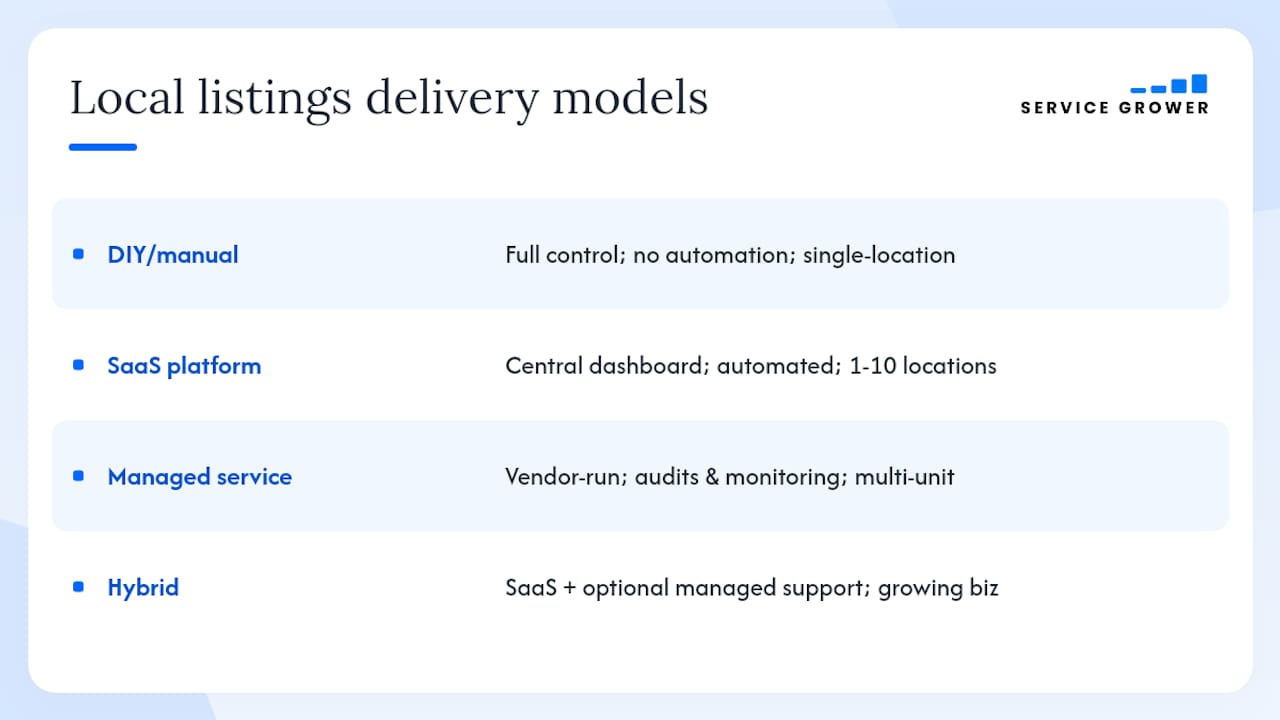
Hybrid combines a SaaS platform with optional managed onboarding or ongoing support. Service Grower operates on this model, which suits growing businesses that want control without a steep learning curve.
The connection to local SEO is direct. Google, Apple Maps, and AI-generated answers all pull from structured business data. When that data is consistent and complete, search engines trust it. When it conflicts, they hedge, and your rankings suffer.
Why active listings management moves the needle
The business case for staying on top of your listings isn’t abstract. It shows up in specific, trackable metrics.
Discoverability. Complete, consistent profiles improve your chances of appearing in the local map pack, the three-result block that captures the majority of clicks for location-based searches. Listings-management platforms that centralize updates and detect duplicates are a core part of how businesses maintain that presence at scale.
Conversion signals. Map-pack impressions only matter if they lead somewhere. Tracked metrics to watch include click-to-call volume, direction requests, website clicks from your profile, and booking completions. These are all visible inside Google Business Profile’s analytics dashboard.
Trust and fewer wasted trips. A customer who drives to your old address because Yelp hasn’t been updated is a lost customer. Accurate hours and location data reduce those friction points directly.
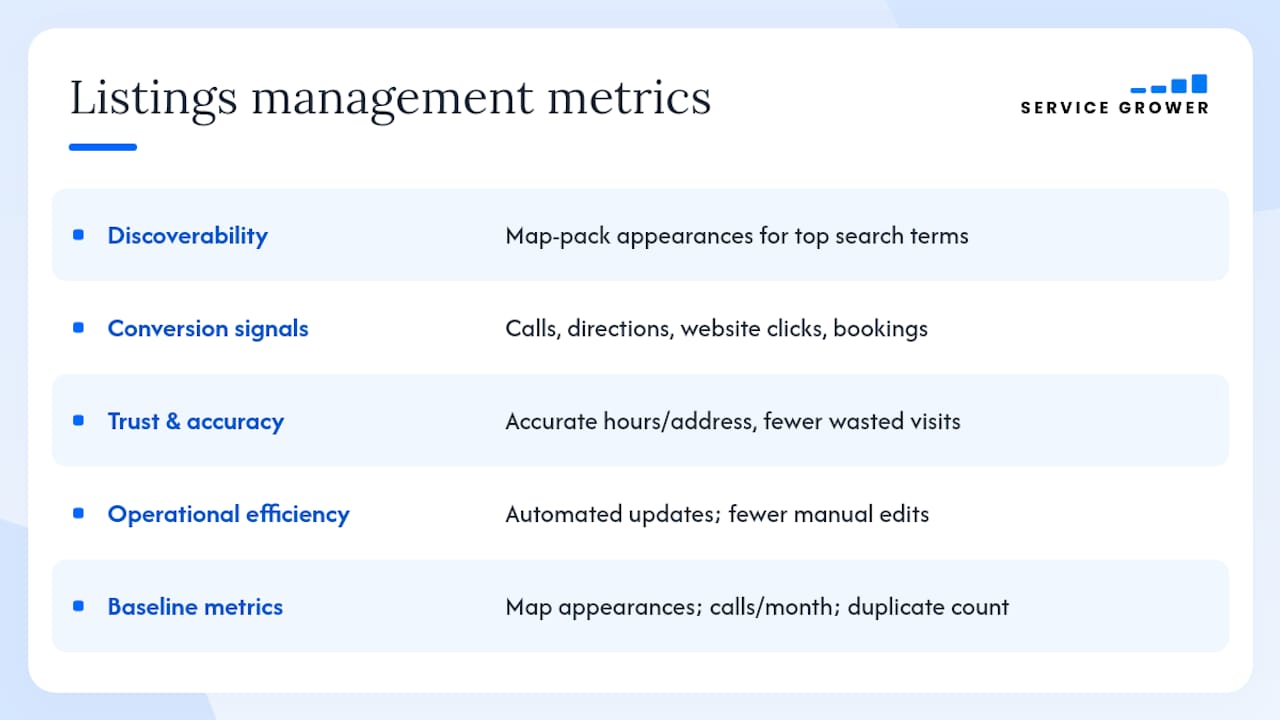
Operational efficiency. Automated distribution and monitoring cuts the time your team spends manually updating listings across platforms. Platform dashboards that flag inconsistencies are a common ROI driver because they prevent duplicate listings from creeping back in after a bulk update.
Indirect benefits stack on top. Businesses with accurate, complete profiles tend to collect more reviews because customers can find and interact with them more easily. Consistent data also improves ad relevance when you run Google or Meta campaigns, since the platform can match your ad targeting to verified location data. AI-generated answers in tools like ChatGPT and Perplexity increasingly pull from structured directory data, so businesses with clean listings get cited more often in those results.
Metric baseline to set in week one: record your current map-pack appearances for your top five search terms, your monthly call volume from your Google Business Profile, and your total duplicate listing count. These three numbers tell you where you started.
How do you choose the right listings-management platform?
The right platform depends on your location count, your team’s bandwidth, and how much of the work you want to own. Here’s a practical framework.
Comparison criteria
| Dimension | What to evaluate |
|---|---|
| Supported networks / directories | Does it cover Google, Apple, Bing, Yelp, Facebook, Data Axle, Foursquare, and your vertical directories? |
| Best for | Single-location, multi-location (5–50), or enterprise (100+)? |
| Automation & bulk editing | API access, CSV import, bulk-field updates across all locations at once? |
| Duplicate detection & data hygiene | Does it flag and suppress duplicates automatically, or only on request? |
| Review management & response workflows | Centralized inbox, response templates, alert routing? |
| Reporting & analytics | Call tracking, map-pack impressions, conversion events, location-level breakdowns? |
| Integrations | CMS, CRM, Google Ads, Meta Ads? |
| Pricing model | Per-location subscription, flat-fee managed service, tiered bundles? |
Vendor questions to ask on a discovery call
Ask specifically about API availability and whether you retain data ownership if you cancel. Request an onboarding timeline with milestones. Ask for a case study from a business in your vertical and location count. Confirm what security certifications or compliance standards the platform meets, and ask for a sample SLA that defines uptime and support response times.
Red flags
Walk away if a vendor can’t show you a duplicate-suppression report, won’t clarify data ownership on exit, has no API or bulk-edit capability, or gives you a pricing quote that changes significantly after the demo. Opaque pricing is a reliable signal of a difficult vendor relationship.
Pro Tip: During the demo, ask the vendor to walk you through a three-location bulk update and pull a duplicate-suppression report live. A vendor who can’t do that in real time probably can’t do it reliably in production.
Validating a vendor’s duplicate-suppression claim is straightforward: ask for before-and-after reports from a trial import covering around 20 sample locations. That’s a standard ask, and any serious platform should have it ready.
Which directories should U.S. businesses prioritize?
Focus your effort on the networks that actually drive consumer decisions and feed downstream data. For most U.S. businesses, the priority list looks like this:
Google Business Profile is non-negotiable. It controls your appearance in Google Search and Google Maps, which together handle the largest share of local search queries in the U.S. Photos, posts, booking links, and analytics all live here. Claim it first.
Apple Business Connect feeds Apple Maps, Siri, and Apple’s ecosystem. iPhone users represent a significant share of mobile search, and Apple Maps is the default navigation app on iOS. Apple Business Connect is free and often overlooked.
Bing Places syncs with Microsoft’s search ecosystem, including Bing Maps and Cortana. Market share is smaller than Google’s, but Bing users skew older and tend to convert at higher rates in certain service categories.
Yelp for Business carries particular weight in food, home services, health, and beauty. Yelp’s review ecosystem also feeds into Apple Maps and other downstream platforms, so a strong Yelp presence has a multiplier effect.
Facebook / Meta Business Profile matters because consumers search for businesses directly on Facebook and Instagram. A complete, verified Meta Business Profile also improves ad targeting accuracy when you run local campaigns.
Data Axle / Neustar is a data aggregator, not a consumer-facing directory. Its role is to distribute your business information to hundreds of downstream directories, apps, and GPS systems. Fixing your record at the aggregator level is one of the most efficient moves in a citation cleanup.
Foursquare powers location data for a wide range of apps, platforms, and services that don’t have their own business-data infrastructure. Claiming your Foursquare listing ensures your information flows correctly through that network.
Beyond these seven, the right niche directories depend on your vertical. A medical practice should be on Healthgrades and Zocdoc. A restaurant needs OpenTable or Resy. A contractor benefits from Angi and HomeAdvisor. Regional chambers of commerce and local business associations also carry citation authority in their markets. The principle from local SEO citation best practices holds: quality over quantity, and claim the high-authority platforms before expanding into niche ones.
For vertical-specific marketing tooling, particularly in industries like medical aesthetics, resources like digital marketing tools for aesthetic reps show how directory strategy integrates with broader channel planning.
How to build and maintain local citations step by step
This is the operational playbook. Follow it in order.
-
Audit your existing listings. Search Google for your business name plus city, then search for common variations (abbreviations, old addresses, alternate phone numbers). Check Data Axle and Foursquare directly. Pull a backlink report in a tool like Ahrefs or Google Search Console to surface directories linking to your site. Record every listing you find in a master spreadsheet: platform name, URL, current NAP data, and status (claimed/unclaimed, accurate/inaccurate).
-
Identify duplicates. Look for multiple listings on the same platform with different addresses, phone numbers, or name variations. Flag each one. Duplicates confuse search engines and split your review equity.
-
Claim and verify priority profiles. Start with Google Business Profile, Apple Business Connect, and Bing Places. Each has its own verification flow: Google typically uses a postcard, phone call, or video verification; Apple uses email or SMS. Avoid using virtual addresses or PO boxes during verification. Google’s guidelines explicitly flag these, and a listing verified with a virtual address is at risk of suspension.
-
Optimize every field. Complete what practitioners call “NAP+” — not just name, address, and phone, but also your canonical website URL, primary and secondary categories, a keyword-informed business description, service areas, attributes, and photos. NAP+ consistency means using the exact same string everywhere: if your address is “Suite 200,” it’s “Suite 200” on every platform, not “Ste. 200” on some and “#200” on others. Mixing tracking phone numbers across platforms breaks trust signals, so use your primary business number consistently.
-
Suppress and merge duplicates. Most platforms have a process for reporting duplicate listings. For Google, use the “suggest an edit” or “claim this business” flow to merge or remove duplicates. For aggregators like Data Axle, submit a correction directly through their business portal.
-
Distribute to secondary directories. After your core profiles are clean and verified, use a SaaS platform or managed service to push your data to secondary directories. Automated distribution tools can push updates across dozens of platforms simultaneously and flag any that reject or modify your submission.
-
Set a monitoring cadence. Check your listings at 30, 60, and 90 days after the initial cleanup, then quarterly after that. Platforms occasionally overwrite your data with user-suggested edits or aggregator updates. A platform dashboard that flags inconsistencies catches these before they compound. Assign a named owner for this task internally, whether that’s a marketing coordinator, an office manager, or an agency contact.
How do reviews connect to your listings strategy?
Reviews and listings aren’t separate workstreams. They’re the same customer experience, viewed from two angles.
A complete, visible listing is what gets a customer to your profile. Once there, your review count and average rating determine whether they call or keep scrolling. Google’s local ranking factors include review signals, and businesses with higher review velocity tend to hold map-pack positions more consistently than those with stagnant profiles.
The practical response framework is simple. Respond to every review within 48 hours. For positive reviews, acknowledge the specific detail the customer mentioned rather than using a generic “thanks for your feedback” reply. For negative reviews, keep the tone calm, acknowledge the experience without admitting fault where it’s disputed, and offer to resolve the issue offline. A response that reads as defensive or dismissive does more damage than the original negative review.
Automation helps at scale. Review alert systems notify you the moment a new review posts, so you’re not checking five platforms manually every morning. Response queues let a team member draft replies for approval before they go live. Tying review data back into your CRM or booking system lets you follow up with customers who had a poor experience before they post publicly.
The link between listings visibility and review acquisition is direct. More impressions mean more customers, and more customers mean more review opportunities. Businesses that use booking integrations on their Google Business Profile, like the SmartRequest forms Service Grower provides, see higher review rates because the post-service follow-up flow is built into the customer journey.
What does listings management cost, and how does pricing scale?
Pricing varies significantly by location count, feature set, and delivery model. Here’s how to think about it.
Common pricing models
- Per-location subscription: — You pay a monthly fee per business location. This model scales predictably and is common among SaaS platforms serving multi-location businesses.
Three budget scenarios
Single-location DIY. Your cost is time, not money. Claim your profiles manually, use Google’s free analytics, and set a monthly calendar reminder to check for changes. This works until your competition gets serious or your location count grows.
5–10 locations, hybrid model. At this scale, manual management breaks down. A SaaS platform with bulk-edit capability and a managed onboarding saves weeks of setup time. Budget for the platform subscription plus a one-time setup fee for data import and duplicate cleanup. Factor in whether the platform includes review management or whether that’s a separate add-on.
100+ locations, enterprise. At this scale, API access and CRM integration are non-negotiable. You’ll need a platform that can handle bulk updates programmatically, generate location-level reporting, and integrate with your existing marketing stack. Growth in business software adoption supports the investment case: centralized platforms reduce per-location management costs significantly as location count grows. Factor in training, dedicated support, and data-portability terms before signing a long-term contract.
When budgeting for managed ad add-ons alongside listings management, the Google Ads cost guide for local businesses is a useful companion resource for setting realistic expectations.
Why Service Grower works for U.S. SMBs
Service Grower is built for the local business owner who needs an integrated platform, not a collection of disconnected tools. Here’s how its features map to real business outcomes:
| Feature | Business outcome |
|---|---|
| AnswerReady™ websites | Faster indexing by Google and AI search engines; structured data built in from day one |
| Centralized listings sync | One update pushes to all connected directories; no manual platform-by-platform edits |
| SmartRequest booking forms | Customers book directly from your listing or website; fewer missed leads |
| GrowthView analytics | Location-level reporting on impressions, calls, and bookings in one dashboard |
| Review management | Centralized inbox, response workflows, and automated follow-up to grow review volume |
| Google and Meta Ads integration | Ad targeting uses verified listing data; campaigns and organic presence stay aligned |
The platform is designed for businesses that want centralized data ownership. You control your listing data, and it’s portable if you ever change platforms. Integrations with CRM systems, CMS platforms, and ad networks mean Service Grower fits into an existing marketing stack rather than replacing it.
For businesses in competitive local markets, the combination of AnswerReady websites and centralized listing sync addresses the two biggest gaps most SMBs have: a website that AI search engines can actually read, and listing data that stays consistent without constant manual intervention. Service Grower’s platform is built around that specific problem.
Your 30/60/90-day implementation plan
Days 1–30: audit and claim
- Build your master spreadsheet: every existing listing, its URL, current NAP data, and status.
- Claim and verify Google Business Profile and Apple Business Connect.
- Identify and flag your top five NAP inconsistencies across priority directories.
- Fix those five inconsistencies manually before running any automated distribution.
- Enable core integrations: connect your booking system, CRM, and analytics tools to your listings platform.
- Assign a named owner for ongoing listings maintenance.
Days 31–60: optimize and distribute
- Complete NAP+ fields on all priority profiles: categories, descriptions, photos, attributes, service areas, and holiday hours.
- Run bulk updates through your SaaS platform to push clean data to secondary directories.
- Activate duplicate-suppression monitoring and resolve any flagged duplicates.
- Set up your review collection flow: post-service follow-up emails or SMS, response queue, and alert routing.
- Establish your reporting baseline: map-pack appearances, call volume, and booking completions for the month.
- Train any staff who will handle review responses or listing updates.
Days 61–90: measure and govern
- Pull your first full performance report: compare map-pack appearances, call volume, and bookings against your baseline.
- Optimize categories and attributes based on what search terms are driving impressions.
- Set a recurring quarterly audit schedule with calendar reminders and a named reviewer.
- Finalize your governance document: who owns updates, what the escalation path is for platform issues, and how new locations get onboarded.
- Review your duplicate count and confirm suppression is holding.
- If you’re working with an agency or platform vendor, schedule a quarterly business review to assess performance against agreed KPIs.
The handoff to an agency or internal owner works best when the governance document is in place before the handoff happens. Whoever takes over should have access to the master spreadsheet, the platform login, and the reporting baseline from day one.
The case for integrated platforms over point tools
The conventional wisdom in local SEO is that you can assemble a capable stack from individual tools: one for citation distribution, another for review monitoring, a third for analytics. That’s technically true, and for a single-location business with a patient operator, it works.
The problem shows up at scale and under pressure. When your Google Business Profile gets a user-suggested edit that changes your address, you need to catch it fast. When a new location opens, you need clean data pushed to 50+ directories before the doors open. When a negative review lands at 9 PM on a Friday, you need an alert and a response queue, not a login to five separate platforms.
Integrated platforms solve the coordination problem that point tools create. The real cost of a fragmented stack isn’t the subscription fees; it’s the staff time spent reconciling data across systems that don’t talk to each other. A single dashboard that covers distribution, duplicate suppression, review management, and reporting eliminates that overhead.
DIY still makes sense for a single-location business in a low-competition market. Claim your profiles, complete your NAP+ fields, and set a quarterly reminder to check for changes. That’s a legitimate strategy when the competitive stakes are low.
The moment you add a second location, or the moment a competitor with a cleaner listing starts outranking you, the calculus changes. Managed onboarding with a platform like Service Grower compresses months of manual work into weeks, and the ongoing automation keeps your data clean without requiring a dedicated staff member to babysit it.
The question isn’t whether to manage your listings. It’s whether the cost of doing it manually is lower than the cost of the platform. For most businesses past the single-location stage, it isn’t.
Service Grower gives your listings a foundation that holds
Most local businesses don’t lose customers because of bad service. They lose them because a customer searched, found an outdated address or a competitor with a cleaner profile, and moved on. Service Grower closes that gap with a platform built specifically for U.S. local businesses: centralized listing sync across priority directories, AnswerReady websites that AI search engines can read and cite, SmartRequest booking forms that capture leads directly from your profile, and GrowthView analytics that show you exactly what’s working.

The free audit covers your current listing accuracy across core networks, duplicate count, and NAP+ completeness. You’ll know within 24 hours where your biggest gaps are. Data stays yours, and the platform integrates with your existing CRM, CMS, and ad accounts from day one.
Book a 15-minute call to see the audit in action, or explore the platform to see how Service Grower fits your location count and growth plans.
Useful sources
These sources are worth bookmarking for verification, deeper reading, and staying current on local SEO best practices.
- Local SEO Citations: What They Are & How to Use Them
- How to Build Local Citations & Boost Your Visibility Online | WordStream
- searchenginejournal.com
- grandviewresearch.com