
 GROWTH GUIDE
3 Copyable JSON-LD Patterns for Local Business Schema That Get Cited
Local business schema is structured data, usually written in JSON-LD, that tells Google and AI systems exactly who you are, where you operate, and how customers reach you. The fastest path to results: add a LocalBusiness block (or a more specific subtype like Restaurant or ProfessionalService) with your name, address, phone number, and matching Google Business Profile details, then validate it. Get that right and you improve your odds of rich results and accurate AI citations.
TL;DR:
- Using specific
@typesubcategories likeRestaurantorDentistenhances AI recognition and local pack display compared to genericLocalBusiness.- Required fields include business name, address with postal and country details, and phone number, validated for exact matches with your Google Business Profile.
- Add optional properties like geo coordinates, opening hours, URL, and images to improve your chances of rich result eligibility and AI citation accuracy.
- For multiple locations, create one
Organizationblock with uniqueLocalBusinessblocks on each location page, linked by a parent-child relationship.- Regularly validate schema with Google’s Rich Results Test and ensure consistency with your GBP to prevent silent eligibility issues and improve local search visibility over time.
Table of Contents
- How Do You Add LocalBusiness Schema to a Location Page?
- What Does a LocalBusiness JSON-LD Example Look Like?
- Which Properties Are Required and Which Are Recommended?
- How Do You Handle Multiple Locations or Service Areas?
- How Do You Validate LocalBusiness Schema and Fix Errors?
- How Does Schema Align With Google Business Profile and AI Search?
- What Does a Schema Audit Actually Check?
- When Does Schema Actually Move the Needle?
- Let Service Grower Handle Your Schema and Local Visibility Together
- Sources
- FAQ
How Do You Add LocalBusiness Schema to a Location Page?
Building correct markup is mostly a matter of picking the right type and filling in a handful of fields in the right format. Here’s the sequence that avoids the mistakes that trip up most first attempts.
-
Pick the most specific
@typeyou can justify. Schema.org lists dozens of LocalBusiness subtypes:Restaurant,Dentist,PlumbingService,HairSalon,AutoRepair. A genericLocalBusinesstype validates fine, but Schema exists precisely so search engines and AI tools can pull richer, more relevant signals from a specific category. Practitioner guidance backs this up directly: choosing a specific subtype over the generic type improves the quality of the signal AI systems use when deciding who to cite, according to Gatilab’s JSON-LD guide. -
Build the required fields first. At minimum, you need
name,address(as a nestedPostalAddressobject), andtelephone. Google’s structured data documentation treats these as the baseline for rich result eligibility, per Google Search Central. -
Layer in recommended properties.
geocoordinates,openingHoursSpecification,url,image, andsameAsaren’t required, but they’re what separates a bare-minimum block from one that actually helps you show up in local packs and get quoted correctly by AI assistants. -
Decide on placement: one location, or many? A single-location business puts one
LocalBusinessblock on its homepage or contact page. A multi-location brand needs oneLocalBusinessblock per location page, each nested under or linked to a sitewideOrganizationblock, a pattern Gatilab’s guide describes as the standard for chains and franchises. -
Run your pre-publish checklist. Confirm the JSON-LD is valid syntax (a single missing comma breaks the whole block), confirm every required field is present, confirm your NAP (name, address, phone) matches your Google Business Profile character-for-character, and confirm the script sits in the page’s
<head>or<body>without being blocked by JavaScript rendering issues.
Pro Tip: Write your JSON-LD by hand once, even if you plan to use a generator afterward. Understanding the nested structure of PostalAddress and openingHoursSpecification makes debugging validator errors ten times faster later.
If you’d rather not hand code every block, a tool like the JSON-LD Schema Generator can produce a starting template you then customize field by field.
What Does a LocalBusiness JSON-LD Example Look Like?
Seeing working code beats reading a property list. Here are three patterns you can adapt directly, from simplest to most complex.
Minimal single-location business:
{
  "@context": "https://schema.org",
  "@type": "LocalBusiness",
  "name": "Riverside Auto Repair",
  "address": {
    "@type": "PostalAddress",
    "streetAddress": "412 Elm Street",
    "addressLocality": "Springfield",
    "addressRegion": "IL",
    "postalCode": "62701",
    "addressCountry": "US"
  },
  "telephone": "+1-217-555-0142",
  "url": "https://riversideauto.example.com"
}
Restaurant subtype with cuisine and reservations:
{
  "@context": "https://schema.org",
  "@type": "Restaurant",
  "name": "Marco's Trattoria",
  "servesCuisine": "Italian",
  "acceptsReservations": "True",
  "menu": "https://marcostrattoria.example.com/menu",
  "address": {
    "@type": "PostalAddress",
    "streetAddress": "88 Harbor Lane",
    "addressLocality": "Newport",
    "addressRegion": "RI",
    "postalCode": "02840",
    "addressCountry": "US"
  },
  "telephone": "+1-401-555-0199"
}
Service business with an offer catalog:
{
  "@context": "https://schema.org",
  "@type": "HVACBusiness",
  "name": "Coldwell Heating & Air",
  "telephone": "+1-630-555-0177",
  "hasOfferCatalog": {
    "@type": "OfferCatalog",
    "name": "HVAC Services",
    "itemListElement": [
      { "@type": "Offer", "itemOffered": { "@type": "Service", "name": "AC Repair" } },
      { "@type": "Offer", "itemOffered": { "@type": "Service", "name": "Furnace Installation" } }
    ]
  }
}
- The
OfferCatalogpattern, built fromOfferobjects tied toServiceitems, is documented in Schema.org’sServicetype and lets you list packages without cluttering the top-level block. - Personalize the
address,telephone, and@typeon every page. Never copy one location’s block onto another location’s page. - Only add
acceptsReservationsorservesCuisinewhen the subtype genuinely supports it; irrelevant fields don’t hurt validation but they add clutter.
Which Properties Are Required and Which Are Recommended?
Google draws a firm line between what a LocalBusiness block needs to be eligible for rich results and what makes that listing genuinely competitive.
Required for eligibility:
@type: the LocalBusiness type or subtypename: your business’s exact legal or trading nameaddress: a nestedPostalAddressobject withstreetAddress,addressLocality,addressRegion,postalCode, andaddressCountrytelephone: in a consistent, dialable format
Recommended for stronger visibility:
geo: latitude and longitude as aGeoCoordinatesobject, precise to at least four decimal placesopeningHoursSpecification: structured hours, not a plain-text stringurl: the canonical URL of that specific location’s pageimage: a representative photo, ideally the same one used on your Google Business ProfilesameAs: an array of URLs pointing to your GBP listing, Facebook page, and other verified profilespriceRange: a simple indicator like$$aggregateRating: only when you have genuine, schema-eligible review data to back it
Schema.org’s LocalBusiness reference shows the full property table, and current estimates put LocalBusiness markup in use on somewhere between 1 million and 10 million domains, per Google’s own crawl data. That’s a wide range, but it tells you this isn’t a niche technique. It’s baseline infrastructure for any business with a physical or service footprint.
Subtype-specific fields matter too. A MedicalBusiness benefits from medicalSpecialty, a Restaurant from servesCuisine, a ProfessionalService from areaServed. Formatting discipline matters as much as field selection: geo coordinates need real decimal precision, phone numbers should include the country code, and addressCountry should use the two-letter ISO code, not a full country name.
How Do You Handle Multiple Locations or Service Areas?
Franchises, multi-location chains, and businesses that serve a radius rather than a single storefront all need a different structural approach than a single-location shop.
- Create one sitewide
Organizationblock with a stable@id(typically your brand’s canonical URL with a fragment, likehttps://example.com/#organization). - On each location page, add a
LocalBusinessblock with aparentOrganizationproperty referencing that same@id. This is the pattern Gatilab’s guide recommends: oneOrganizationblock anchoring the brand, and oneLocalBusinessblock per physical location. - Use
branchCodeto distinguish sibling locations under one legal entity, anddepartmentwhen a location houses multiple distinct business units (a hotel with an in-house spa, for example). - For businesses without a public storefront, mobile services, home repair, traveling consultants, model the coverage area with
areaServed(a list of city or region names) or aGeoShapewith a defined radius, rather than forcing a fake address. - Publish exactly one
LocalBusinessblock per canonical location URL. Duplicate markup across pages, or a single page listing five locations, confuses both crawlers and AI parsers. - Keep your sitemap current with each location’s canonical URL; a schema block on an orphaned or redirected page does nothing.
This structure, sometimes called the “hub and spoke” pattern, mirrors how Google already understands corporate hierarchies. Get it right once, and adding a new location later is a matter of duplicating one block and swapping five fields.
How Do You Validate LocalBusiness Schema and Fix Errors?
Writing the JSON-LD is half the job. Confirming it actually parses the way you intended is the other half, and it’s the step most owners skip.
- Run the page through Google’s Rich Results Test, which shows exactly which required fields are missing and whether the page qualifies for enhanced search features.
- Cross-check with the Schema Markup Validator for syntax-level issues the Rich Results Test doesn’t always flag, like malformed nested objects.
- Look for the usual suspects: a NAP mismatch between your schema and your Google Business Profile, a
PostalAddressmissing a subfield likeaddressRegion, anopeningHoursSpecificationwritten as loose text instead of structureddayOfWeekand time values, or geo coordinates rounded so aggressively they place you blocks away from your real address. - After fixing errors, request re-indexing in Search Console and monitor for rich result appearance over the following weeks.
- Track downstream impact: impressions and click-through in Search Console, whether the local pack listing improves, and whether AI tools citing your business get the details right when asked.
Pro Tip: Bookmark the Rich Results Test and re-run it every time you update hours, add a location, or change your business name. Schema errors are silent. Nothing breaks visibly on the page, but eligibility for rich results quietly disappears.
How Does Schema Align With Google Business Profile and AI Search?
Structured data doesn’t operate in a vacuum. It works alongside your Google Business Profile, and the two need to agree, not just coexist.
- Match everything, exactly. Name, address, phone number, and website URL should be character-for-character identical between your schema and your GBP listing. Gatilab’s guidance frames this as a high-impact, low-effort fix: mismatches between structured data and GBP can suppress local-pack eligibility even when both sources are individually correct.
- Use
sameAsas your cross-reference list. Add your GBP URL, Facebook page, and Apple Maps listing to thesameAsarray. This gives AI systems an explicit trail to confirm you’re the same business across platforms, rather than making an inference. - Prioritize subtype specificity and real photos for AI citation quality. A specific
@type, a genuineaggregateRating(only when you have real review data structured correctly), and an accurateimagefield all feed into how confidently an AI assistant can describe your business when someone asks for a recommendation nearby. - Keep each location page singular in purpose. A page trying to represent three locations at once dilutes the signal. One address, one phone number, one schema block, one clear answer.
What Does a Schema Audit Actually Check?
Most DIY schema attempts fail quietly, valid syntax, wrong data, or a mismatch nobody caught. A proper audit checks the whole picture, not just whether the code parses.
- Confirm every required field is present and every recommended field that applies to your business type is populated, not left as a placeholder.
- Verify NAP consistency between schema, your website footer, and your Google Business Profile.
- Run every location page through the Rich Results Test and log which ones fail and why.
- Check that
sameAslinks to live, active profiles, not dead or unclaimed pages. - Set a monitoring baseline: local pack position, impression volume in Search Console, and booking or call volume tied to location pages.
Service Grower builds this checklist into its AnswerReady™ Websites, which are structured from the ground up to keep schema, GBP data, and on-page content in sync as your business details change.
When Does Schema Actually Move the Needle?
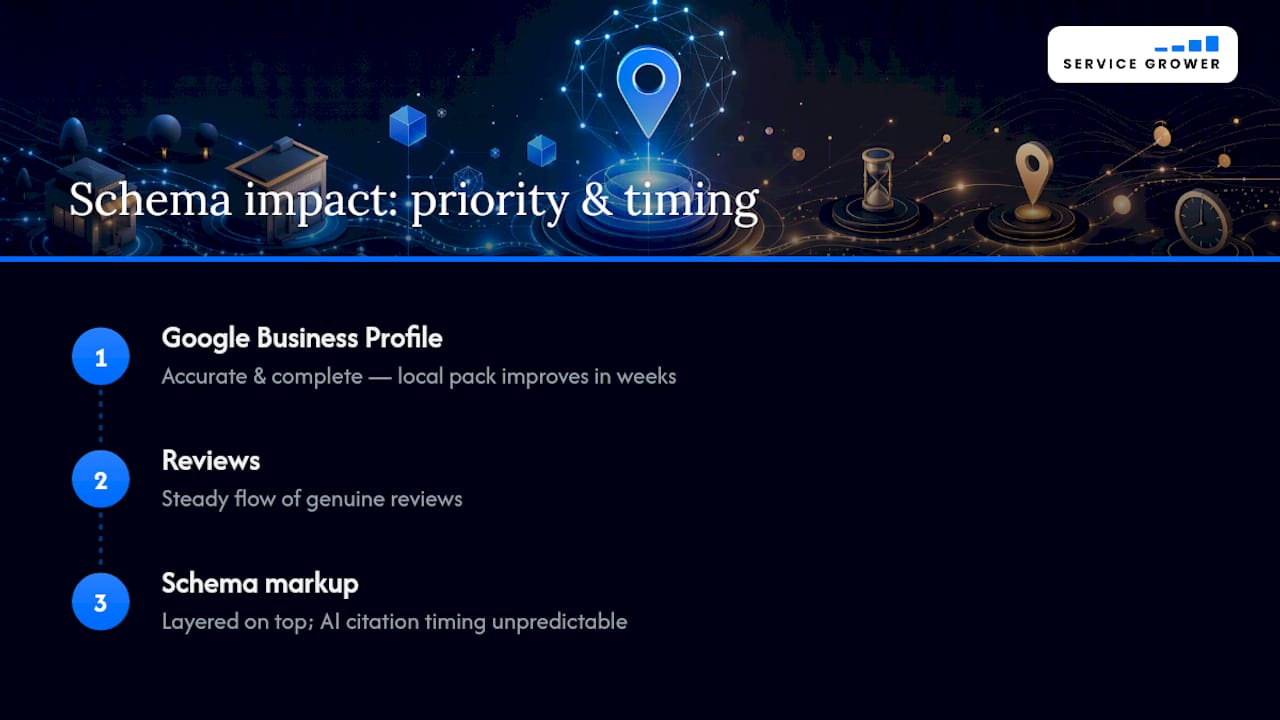
Schema markup is not a shortcut around the fundamentals. Expect local pack improvements to show up over a few weeks once your fields are correct and validated. AI citation improvements move on a less predictable clock, sometimes fast, sometimes slow, because it depends on when each system recrawls and reprocesses your site.
Prioritize in this order: an accurate, fully filled Google Business Profile first, a steady flow of genuine reviews second, and schema markup third, layered on top rather than treated as a replacement for the first two. Schema helps machines describe you correctly. It does nothing to fix an outdated GBP listing or a business with three reviews from 2019.
— Service Grower
Let Service Grower Handle Your Schema and Local Visibility Together
There are integrated platforms designed to build correct structured data into your location pages from day one and keep it aligned with your Google Business Profile as details change.

Instead of juggling a schema generator, a separate GBP dashboard, and a review-tracking spreadsheet, AnswerReady™ Websites bake structured data, AI readiness, and NAP consistency into every location page automatically. If you manage several locations or service areas, that means one system enforcing the Organization and LocalBusiness pattern correctly instead of five separate pages drifting out of sync. This is a straightforward next step, not a full-service overhaul: run a free AI Visibility Check to see exactly where your current schema and AI presence stand today, then decide what to fix first.
Sources
FAQ
What Is Local Business Schema?
It’s structured data, typically JSON-LD, that identifies a physical business location to search engines and AI systems using the LocalBusiness type or a more specific subtype like Restaurant or Dentist.
Can You Give an Example of LocalBusiness Schema?
A minimal example includes @type: LocalBusiness, a name, a nested PostalAddress with street, city, state, zip, and country, and a telephone field, all wrapped in a <script type="application/ld+json"> tag.
How Do I Add Local Business Schema to My Website?
Write or generate the JSON-LD with your required fields, place it on the specific location’s page (not sitewide), then validate it with Google’s Rich Results Test before publishing.
What Is a Business Schema?
“Business schema” usually refers to structured data describing an organization, either the Organization type for a brand overall or LocalBusiness for a specific physical or service location, and the two are often linked together on multi-location sites.
Does Local Business Schema Affect AI Search Results?
Yes. A specific, accurate LocalBusiness block with a matching sameAs reference to your Google Business Profile gives AI assistants a clearer, more confirmable basis for citing your business correctly.