
 GROWTH GUIDE
Instagram Ads for Local Business: Your 30-Day Blueprint
Run a Reels-first awareness campaign to a tight geographic radius, then retarget viewers with Stories or Lead Ads that push a single clear action. That’s the core playbook for Instagram ads for local business, and it works whether you’re a barber in Austin or an HVAC company in suburban Ohio. Set your location radius, choose either the Leads or Store Traffic objective inside Meta Ads Manager, shoot a 15–30 second vertical Reel featuring your staff or a before/after, and start at $10–30/day per location. Measure calls and bookings, not likes.
- Connect accounts: Link your Instagram professional profile to Meta Ads Manager before anything else.
- Install tracking: Add the Meta Pixel or Conversions API to your website and test that events fire correctly.
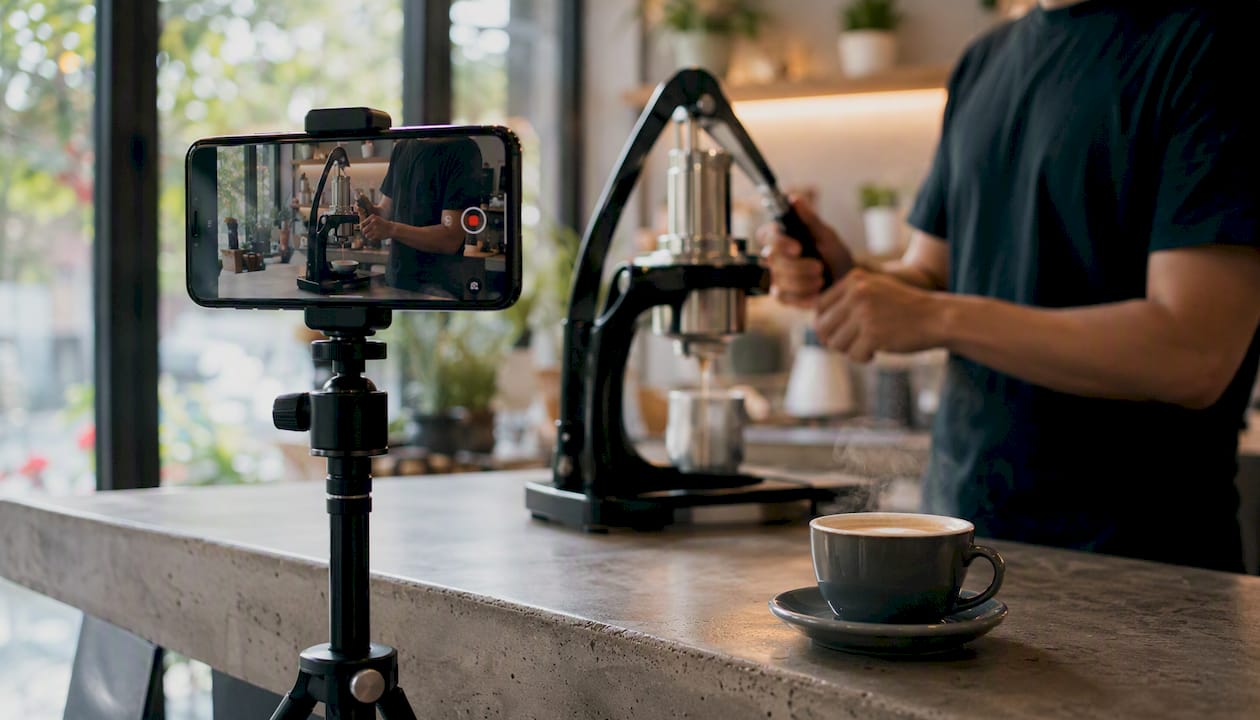
- Create one Reel: 15–30 seconds, vertical, showing your location, staff, or a result. Hook in the first two seconds.
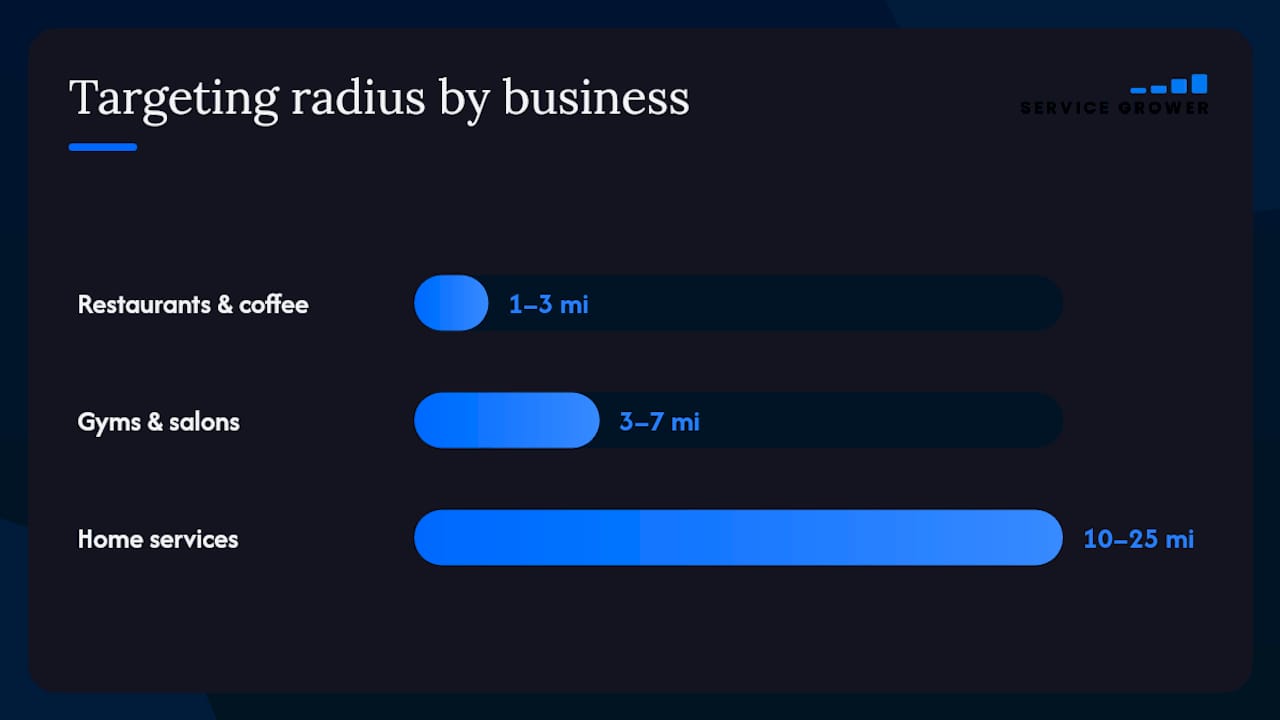
- Set your radius: 1–3 miles for restaurants and retail; 10–25 miles for home services and trades.
- Choose your objective: Leads for appointment-based businesses; Store Traffic for walk-in locations.
- Budget: $10–30/day per location to exit Meta’s learning phase within two to three weeks.
- Measure off-app: Track calls, booked appointments, and in-store visits, not follower counts.
If you’d rather skip the setup entirely, Service Grower offers managed Meta ad packages that handle campaign structure, creative, and reporting for local businesses.
Key Takeaways
Instagram ads for local businesses work best when geography comes first, creative matches the placement, and success is measured in calls and bookings rather than clicks or followers.
| Point | Details |
|---|---|
| Start with $10–30/day | This budget range exits Meta’s learning phase within two to three weeks and produces reliable signal. |
| Use a three-stage funnel | Reels prospecting → Feed/Stories consideration → Lead Ads conversion maps to how local customers actually decide. |
| Tighten your radius | Restaurants: 1–3 miles; home services: 10–25 miles. Minimal demographic filters let Meta optimize within that area. |
| Measure off-app outcomes | Track cost per booked appointment and cost per call, not likes or reach, to judge true campaign ROI. |
| Service Grower managed option | Service Grower’s managed Meta ad packages handle campaign setup, creative direction, and weekly optimization for local businesses. |
Table of Contents
- Why does Instagram work so well for neighborhood businesses?
- How should you structure your Instagram ad campaign?
- How do you target your actual service area on Instagram?
- What creative actually works for local Instagram ads?
- What do you need to set up before launching?
- How much should you budget for local Instagram ads?
- How do you measure real business results, not just clicks?
- What mistakes do local businesses most often make with Instagram ads?
- A real-budget example: what $600/month actually produces
- How Service Grower helps local businesses run and measure Instagram ads
- Three rules that actually govern local Instagram ad performance
- Ready to run Instagram ads that actually book customers?
- Sources
Why does Instagram work so well for neighborhood businesses?
Instagram’s discovery engine is the key advantage. When someone opens Reels, they are not searching for anything specific. They are browsing, and Meta’s algorithm surfaces content based on location signals, past behavior, and engagement patterns. That means your HVAC company or yoga studio can appear in front of someone who lives three blocks away and has never heard of you. No search intent required.
The geo controls inside Meta Ads Manager are precise enough to make that discovery profitable. You can target by radius down to one mile, by specific zip codes, or by the behavioral segment “people who live in this area” rather than tourists or commuters passing through. That precision keeps your budget focused on people who can actually walk through your door or call your number.
Reels are the top-performing format for local business discovery, with short vertical video consistently outperforming static images for local reach. Instagram also functions as a demand-creation channel rather than a demand-capture one. Unlike Google search ads, where someone is already looking for what you sell, Instagram builds the desire first. Expect visits and calls to build over two to four weeks rather than arriving the same day you launch.
How should you structure your Instagram ad campaign?
A three-stage funnel maps cleanly onto Instagram’s placements and objectives. Each stage has a different job, a different creative format, and a different metric that tells you it’s working.
- Stage 1: Reels prospecting (Awareness). Run 15–30 second Reels to a cold local audience using the Reach or Video Views objective. The goal here is surface area: get your business in front of as many qualified local people as possible. KPI: reach and three-second video views.
- Stage 2: Feed and Stories consideration (Trust). Retarget people who watched at least 50% of your Reel with Feed posts or Stories that answer objections. Show reviews, before/after results, or a staff introduction. KPI: profile visits, link clicks, and message starts.
- Stage 3: Stories and Lead Ads conversion (Book/Call). Hit warm audiences with a single, friction-free offer. Native Instagram lead forms work well here because they often convert at higher rates on mobile than external landing pages when the external page is slow or cluttered. KPI: lead form submissions, booked appointments, calls.
A creative stack approach accelerates this process. Upload multiple creative variants at each stage and let Meta’s algorithm surface winners, typically within two weeks.
| Campaign stage | Objective | Placement | Creative type | Target KPI |
|---|---|---|---|---|
| Prospecting | Reach / Video Views | Reels | 15–30s vertical video | Reach, 3-sec views |
| Consideration | Engagement / Traffic | Feed, Stories | Carousel, review graphic | Profile visits, clicks |
| Conversion | Leads / Store Traffic | Stories, Feed | Lead form, single-offer Story | Leads, booked appointments |
How do you target your actual service area on Instagram?
Radius and zip-code settings are where most local ad budgets either work or get wasted. The right radius depends entirely on how far your customers will realistically travel.
Restaurants and coffee shops rarely draw customers from more than 1–3 miles away in dense urban areas. Gyms and salons typically pull from 3–7 miles. Home service businesses like plumbers, electricians, and HVAC companies can justify 10–25 miles because customers call them rather than drive to them. Tight radius targeting combined with minimal demographic filters gives Meta enough audience scale to optimize while keeping spend inside your service area.
The location-type setting matters too. “People who live in this area” excludes tourists and commuters, which is almost always the right choice for a neighborhood business. “Recently in this area” makes sense for businesses near transit hubs or tourist corridors. Use exclusions to remove zip codes where you don’t serve, or areas with a high concentration of remote workers who may be physically present but not your customer.
Audience size is a real constraint. Meta needs a minimum audience to exit the learning phase and optimize delivery. If your radius produces an audience under roughly 50,000 people, consider loosening demographic filters before narrowing the radius further. Let the geo do the heavy lifting; let Meta’s AI handle the demographic optimization.
Pro Tip: Set your radius and add a few neighborhood-level behavioral signals, but avoid over-filtering with interest stacks, as it can shrink your audience too much and hinder optimization.
What creative actually works for local Instagram ads?
Format priority is straightforward: Reels first, Stories for urgency and offers, Feed or carousel for explanation and before/after content. Each placement puts users in a different mindset, so the creative style needs to match. A Reel is discovery content; a Story is a prompt to act right now.
Format-place fit is the principle behind this. Reels users are browsing and open to being surprised. Stories users are moving fast and respond to time-limited offers. Feed users are slightly more deliberate and will read a caption. Matching your message to that mindset is what separates ads that feel native from ads that feel like interruptions.
Creative checklist for local owners:
- Hook in 1–3 seconds. Show the result, the location, or a surprising visual before you say a word. If the first frame looks like an ad, people scroll.
- Show your face or your team. Local trust is personal. A staff member on camera outperforms stock footage almost every time.
- Use a local reference. Mention the neighborhood, a nearby landmark, or a local event. It signals immediately that this business is for them.
- One CTA only. Pick one: Get Directions, Call Now, Book Appointment, or Send Message. Multiple CTAs dilute action.
- Caption and text overlay. Many people watch without sound. Add captions and a visual hook so the message lands either way.
CTA selection by objective: use “Get Directions” for walk-in businesses running Store Traffic campaigns; “Call Now” for service businesses where a phone call is the first step; “Book Appointment” when you have a booking link or native lead form; “Send Message” for businesses where a quick conversation closes the sale.
Keep Reels to 15–30 seconds. Stories work best under 10 seconds with a single visual and a single line of text. Carousel ads in the Feed can run longer because users choose to swipe.
What do you need to set up before launching?
Getting the account infrastructure right before you spend a dollar saves you from running blind for weeks.
Account setup:
- Convert your Instagram profile to a Professional Account (Creator or Business).
- Connect it to a Facebook Business Page inside Meta Business Suite.
- Open Meta Ads Manager and confirm your ad account is active and your payment method is verified.
- Set your business location and time zone correctly in Ads Manager.
Tracking:
Install the Meta Pixel on your website or set up the Conversions API if you want server-side tracking that survives browser privacy restrictions. Test that events fire correctly using Meta’s Events Manager. Set up a phone-call conversion event using a call-tracking number, or connect your booking system (like a scheduling tool) as a conversion source. For attribution, add UTM parameters to every link: utm_source=instagram&utm_medium=paid&utm_campaign=local-awareness. Verify that Google Analytics or your booking platform registers those sessions correctly.
Landing page and lead forms:
If you’re sending traffic off Instagram, use a single-offer landing page with one CTA. No navigation menu, no multiple offers. A page that asks visitors to do one thing converts far better than a homepage. Alternatively, use Instagram’s native lead forms, which pre-fill contact details from the user’s profile and remove the friction of loading an external page entirely. For appointment-based businesses, a native lead form connected to a booking confirmation workflow is often the fastest path from ad click to booked appointment.
How much should you budget for local Instagram ads?
Start with a modest daily budget per location to provide enough data for Meta to optimize delivery effectively, which usually takes a few weeks. Running below $10/day often means the algorithm never fully optimizes, and you’re drawing conclusions from too little data.
Monthly budgets can vary widely, enabling campaigns of different scale and complexity that help identify what creative and targeting perform well and provide data on cost per lead and return on ad spend.
Once you know your cost per lead, shift more budget toward whichever stage delivers the lowest CPL.
For multi-location businesses, treat each location as a separate ad account or campaign. Pooling budget across locations makes it impossible to see which area is performing and which is wasting money.
Larger jumps reset the learning phase. Refresh creative before doubling budget, and test one variable at a time so you know what actually drove the change.
How do you measure real business results, not just clicks?
Measuring off-app outcomes is what separates a profitable local campaign from one that looks good in Ads Manager but doesn’t move the business. Likes and reach tell you nothing about whether someone booked an appointment or called your number.
Priority metrics mapped to business outcomes:
- Cost per booked appointment. Connect your booking system to Meta as a conversion event. This is the number that tells you whether Instagram ads are worth the spend.
- Cost per call. Use a unique tracking number in your ads. When someone calls that number, the conversion is attributed to the campaign.
- Lead-to-book rate. If you’re running Lead Ads, track how many form submissions actually become paying customers. A high lead volume with a low booking rate means your follow-up process needs work, not your ads.
- Return on ad spend (ROAS) for transactions. For businesses with e-commerce or online booking with a dollar value attached, ROAS tells you the revenue generated per dollar spent.
Optimization routine:
- Daily: Check delivery, CPM, and frequency. If frequency exceeds 3–4 within a week on a small audience, rotate creative immediately.
- Weekly: Compare creative variants. Pause the lowest-performing one and test a new hook or CTA against the winner.
- Monthly: Review unit economics. If cost per booked appointment is below your acceptable threshold, increase budget. If it’s above, audit the funnel stage where drop-off is highest.
For A/B testing, always isolate one variable. Test creative hooks first (the first two seconds of the Reel), then test the CTA, then test audience segments. Changing two things at once makes it impossible to know what drove the result. Tools like Valiz can help reconcile ad-attributed leads against your actual booking system, which is especially useful when you’re running both Instagram and Google campaigns simultaneously.
What mistakes do local businesses most often make with Instagram ads?
Targeting too broadly. Running ads to an entire metro area when your business serves a five-mile radius wastes the majority of your budget on people who will never visit. Tighten the radius first, then worry about creative.
Optimizing for likes instead of leads. Engagement metrics feel good but pay no bills. If your campaign objective is set to Engagement, you’re paying for reactions, not customers. Switch to Leads or Store Traffic and measure bookings.
Sending traffic to a cluttered homepage. A homepage with a navigation menu, multiple offers, and no clear next step kills conversion rates. Use a single-offer landing page or a native lead form instead.
Running one creative forever. Ad fatigue sets in fast on Instagram, especially with small local audiences. When frequency climbs above 3–4 and your CPL rises, the creative is the problem. Rotate monthly at minimum.
Ignoring off-app conversions. If you’re not tracking calls, bookings, and in-store visits, you’re flying blind. Your creative matters more than perfect targeting, and your measurement matters more than both.
Quick fixes: tighten your radius to match your actual service area, swap your campaign objective to Leads, replace your homepage link with a single-offer page or native form, set a calendar reminder to refresh creative every 30 days, and add call tracking today.
A real-budget example: what $600/month actually produces
Consider a single-location massage therapy studio in a mid-size U.S. city. The owner ran a three-stage campaign for 30 days with a $20/day budget ($600/month total).
Setup: Business Account connected to Meta Ads Manager, Meta Pixel installed on the booking page, a 3-mile radius targeting “people who live in this area,” and a native Instagram lead form as the conversion destination.
Creative mix: Two Reels (one showing the studio space and a 20-second therapist introduction; one showing a before/after client experience), one carousel in the Feed with five-star reviews, and one Story with a “Book this week, save $20” offer.
Results after 30 days:
That single swap dropped CPL from $21 to $15.80 by the end of the month. The key learning: the personal, face-on-camera format outperformed the polished property video by a wide margin.
How Service Grower helps local businesses run and measure Instagram ads
Running Instagram ads well requires more than a good Reel. You need tracking in place, a booking system that captures leads, analytics that connect ad spend to actual revenue, and the time to monitor and optimize weekly. Service Grower brings those pieces together in one platform built specifically for local businesses.
What Service Grower provides for Instagram advertising:
- SmartRequest booking forms that capture leads from Instagram ads and route them directly into your workflow, eliminating the gap between a form submission and a confirmed appointment.
- GrowthView analytics that connect ad performance data to real business outcomes, so you can see cost per booked appointment rather than just cost per click.
- AnswerReady websites designed as single-offer landing pages that load fast and convert, rather than the cluttered homepages that kill ad ROI.
- Managed Meta ad packages that handle campaign structure, creative guidance, targeting, and ongoing optimization for local business owners who don’t want to run ads themselves.
When to use managed vs. DIY: If you have time to monitor Ads Manager weekly, test creative monthly, and reconcile leads against your booking system, the DIY playbook in this guide is enough to get started. If you’re running a business and can’t afford to spend four to six hours a week on ad management, a managed service removes that burden while keeping the strategy local and specific to your market.
Service Grower’s managed Meta ad packages are built around the same three-stage funnel described in this guide: Reels prospecting, Stories retargeting, and Lead Ads conversion. The difference is that the setup, creative direction, and weekly optimization happen without you having to touch Ads Manager.
Pro Tip: Before handing off to a managed service, install your Meta Pixel and set up at least one conversion event yourself. Whoever manages your ads will need that data, and starting with it already in place cuts weeks off the ramp-up time.
Three rules that actually govern local Instagram ad performance
Most local businesses overthink the creative and underthink the geography. After working through the mechanics of campaign structure, targeting, and measurement, three rules consistently separate campaigns that produce bookings from ones that produce reports.
Rule 1: Format-place fit before anything else. A polished brand video in a Story placement where users are tapping through in under two seconds is wasted production. Match the creative style to where it appears. Reels reward surprise and authenticity; Stories reward speed and a single offer; Feed rewards explanation. Get this right before optimizing anything else.
Rule 2: Geography is your first filter, not demographics. The temptation is to layer interests, ages, and behaviors until the audience feels “precise.” That precision usually just shrinks the audience below the threshold Meta needs to optimize. Set the radius to match your real service area, add one or two behavioral signals, and let the algorithm do the rest.
Track calls, bookings, and visits, not clicks and likes.
If it’s above threshold after three weeks and you’ve already tested two creative variants, pause and rebuild the offer before spending more.
Ready to run Instagram ads that actually book customers?
Most local business owners who try Instagram ads on their own hit the same wall: the setup takes longer than expected, the results are hard to interpret, and the creative runs stale before anyone notices. Service Grower exists to close that gap.

The platform combines AnswerReady websites built to convert ad traffic, SmartRequest booking forms that capture leads the moment someone taps your ad, and GrowthView reporting that shows cost per booked appointment rather than cost per click. For owners who want ads handled entirely, Service Grower’s managed Meta ad packages cover campaign structure, creative direction, targeting, and weekly optimization. No long-term contracts. No agency retainer. Just a local ad program that runs and reports on real business outcomes.
Book a 15-minute call to see whether the managed option fits your business, or explore the platform to start with the tools and run your own campaign.
Sources
The following references formed the foundation of this guide. Each one is worth bookmarking for deeper reading on specific topics.
- Instagram Advertising for Local Business (2026)
- Instagram Advertising for Local Business: A 2026 Playbook
- Sprout Social — Instagram for small business
- Meta Ads for Local Businesses 2026: The Complete Facebook & Instagram Guide | Optimized Growth
- Instagram Ads That Actually Work for Local Businesses – Sagum
For broader local marketing strategy beyond Instagram, the Service Grower blog covers Google Ads, AI search visibility, and reputation management for local businesses. If you’re deciding how to split budget between Instagram and search, the Google Ads cost guide for local businesses is a useful companion read.