
 GROWTH GUIDE
5–10 Reviews a Month: Google Review Policy 2026 for Local Owners
Stop offering discounts for reviews, stop asking customers on-site before they leave, and stop requesting reviews that mention specific staff members by name. Google’s policy treats all three as rating manipulation, full stop, and the 2026 enforcement wave has made detection faster and penalties steeper. If your business runs a review kiosk, a points-for-reviews program, or a script that tells customers what to say, pause it today and confirm compliance against Google’s Prohibited & restricted content policy before you resume. Service Grower’s Reviews Management Tool walks you through reporting and fixing violations once you’ve audited your own practices.
TL;DR:
- Offering discounts, asking for reviews on-site, or requesting staff mentions are considered rating manipulation and can lead to penalties under Google’s 2026 enforcement.
- Automated detection monitors review spikes, duplicate accounts, similar phrasing, and suspicious activity, with severe violations risking profile suspension or review removal.
- Submit reports for fake or policy-violating reviews through the Reviews Management Tool, and provide evidence for coordinated attacks to speed enforcement actions.
- Follow a neutral, spaced-out review request process 24 to 72 hours after service, avoiding scripts, incentives, or on-premises prompting to stay compliant.
- Maintaining consistent, documented review solicitation practices over time supports organic growth and reduces the risk of algorithmic penalties.
Table of Contents
- What Google Explicitly Bans Under Its 2026 Review Policy
- What You Can Actually Do to Collect Reviews the Right Way
- How Google Enforces Review Policy and What Happens When You Get Flagged
- How to Report and Appeal Problematic Reviews
- A Compliant Monthly Workflow for Steady Review Growth
- Why Compliance Beats Shortcuts Every Time
- Let Service Grower Handle Your Review Program the Right Way
- Where to Verify These Rules Yourself
- Sources
- FAQ
What Google Explicitly Bans Under Its 2026 Review Policy
Google’s review guidelines rest on one principle: a review has to reflect a real, first-hand experience, untouched by payment, pressure, or scripting. Anything that biases that signal counts as manipulation, and Google has sharpened both its detection and its language around what crosses the line.
Here’s what’s explicitly off-limits:
- Incentivized reviews. Offering payments, discounts, free products, or freebies in exchange for a review, or for editing/removing a negative one, violates Google’s policy outright, even if you don’t specify the review has to be positive.
- Review gating. Pre-screening customers, such as asking “How was your visit?” and only routing the happy ones to Google, is treated as rating manipulation.
- On-premises pressure. Asking customers to leave a review while they’re still in your store, on your device, or before they’ve paid violates the first-hand experience requirement.
- Kiosks and shared tablets. A tablet at checkout prompting an immediate review falls into the same on-premises trap, and it also makes it nearly impossible to prove reviews came from distinct, real customers.
- Requesting staff names. Asking customers to mention a specific employee by name, often tied to internal sales contests, is called out directly in Google’s policy examples.
- Employee and owner reviews. Staff, owners, or their family members posting reviews of the business they work for counts as a conflict of interest, regardless of whether the review is honest.
The most common violation isn’t malicious. It’s a well-meaning owner who hands staff a script (“Ask every customer for a 5-star review and mention your name”) or sets a monthly review quota per employee. Both practices look like normal sales management internally, but they read as manipulation to Google’s systems, and they’re exactly the kind of pattern the 2026 policy update targets more aggressively.
What You Can Actually Do to Collect Reviews the Right Way
Compliant review collection isn’t complicated. It just requires patience and neutral language instead of scripts.
- Wait, then ask neutrally. Send a request 24 to 72 hours after service completion rather than at the point of sale. A message like “Thanks for choosing us. If you have a minute, we’d appreciate your honest feedback on Google” satisfies the neutral solicitation standard because it doesn’t specify a star rating or outcome.
- Use safe channels. Personalized SMS or email works well because it removes the shared-device problem. A QR code on a printed receipt, mailed follow-up, or invoice is also fine, since the customer completes it later, on their own device, in their own time.
- Never script the content. Ask for feedback, not five stars, and never suggest what to write or which employee to mention.
- Know who’s allowed to post. Only actual customers should leave reviews. Keep staff, owners, and immediate family off your own Business Profile entirely.
- Respond to negative reviews publicly, then move privately. Acknowledge the issue in a short public reply, then invite the customer to a phone call or email to resolve it. Never offer compensation in that public reply, since it can look like an incentive for changing the review.
Pro Tip: Keep your review requests spaced out over the week instead of blasting them all after a Friday rush. A steady trickle looks organic to Google’s pattern-detection systems; a Monday spike of 40 identical requests looks like a campaign.
How Google Enforces Review Policy and What Happens When You Get Flagged
Google’s enforcement runs on two layers: automated pattern detection and, when something looks serious enough, manual review. The automated system scans for signals like sudden spikes in review volume, duplicate account behavior, similar phrasing across multiple reviews, and accounts with no other Maps activity suddenly posting a glowing rating.
When those patterns exceed Google’s threshold, the system can act automatically: removing reviews, restricting who can post, or flagging the Business Profile for a closer look. Severe or repeated violations escalate to account-level consequences.
Common enforcement outcomes include:
- Individual reviews removed without notice, sometimes in bulk if they’re tied to a detected pattern.
- Temporary restrictions on new reviews appearing on your profile while Google investigates.
- Profile-level suspension for repeated or severe violations, which can wipe out your entire review history.
- Legitimate reviews occasionally caught in the same sweep as fraudulent ones, since the algorithm optimizes for pattern matching, not perfect accuracy.
Enforcement timelines vary. Automated removals can happen within hours of a suspicious spike; manual reviews tied to reported content or appeals can take days to weeks. The single best way to lower your algorithmic risk is consistency: steady, documented solicitation volume over time reads as organic, while a sudden burst of 50 reviews in one weekend reads as coordinated activity, even when every review is real.
How to Report and Appeal Problematic Reviews
If a competitor, a disgruntled ex-employee, or an outright bot leaves a fake or policy-violating review, you have a defined path to fix it.
- Confirm the violation type. Before reporting, check whether the review actually breaks a rule, such as spam, profanity, conflict of interest, or off-topic content, versus simply being an unflattering but legitimate complaint. Google won’t remove a review just because it’s negative.
- Flag it through the Reviews Management Tool. Navigate to the review on your Business Profile and select the reporting option, then choose the specific reason code (spam, hate speech, conflict of interest, and so on) that matches the violation you identified.
- Track the status. Reported reviews move through decision states: pending, reviewed with no violation found, or removed. This can take anywhere from a few days to a couple of weeks depending on volume.
- Appeal if denied. If Google finds no violation, you get a one-time appeal for that specific report. Use it only when you have clear evidence, since you don’t get a second shot.
- Escalate coordinated attacks. If you spot multiple suspicious reviews arriving in a tight window, especially ones referencing similar language or unrelated complaints, document the pattern with screenshots and timestamps before reporting, since Google’s support teams respond faster to evidence of coordinated manipulation than to a single flagged review.
One caution: don’t delete or transfer ownership of your Business Profile mid-appeal. Google may reject the appeal outright if the profile changes status before a decision is made.
A Compliant Monthly Workflow for Steady Review Growth
You don’t need volume tricks to build a strong review base. You need a repeatable, documented sequence.
The core loop looks like this: service completion, then a neutral request 24 to 72 hours later, then one reminder five to seven days after that if there’s no response, then stop. No third follow-up, no incentive tacked onto the reminder. Service Grower’s own review-generation workflow reports this cadence can produce 5 to 10 new Google reviews a month for a typical local business without tripping any manipulation flags.
Build these controls into the process:
- Keep an internal log of every request sent, including customer name, date, and channel, so you can prove neutral, non-incentivized outreach if Google ever questions a spike.
- Audit your team quarterly for quota creep. If a manager starts telling staff “get five reviews this week,” that’s review gating waiting to happen.
- Route negative feedback through a private channel first: acknowledge publicly, then resolve by phone or email, then follow up a week later to see if the customer will reconsider their review voluntarily.
AnswerReady™ websites make the request link easy to share without a shared device, SmartRequest automates the timed follow-up sequence so nothing goes out on-premises, and GrowthView tracks solicitation volume so you can spot an unintentional spike before Google does.
Why Compliance Beats Shortcuts Every Time
The businesses that treat review policy as a checkbox to game usually end up losing their entire review history overnight. The ones that treat it as a trust exercise keep building, slowly, review by review, for years.
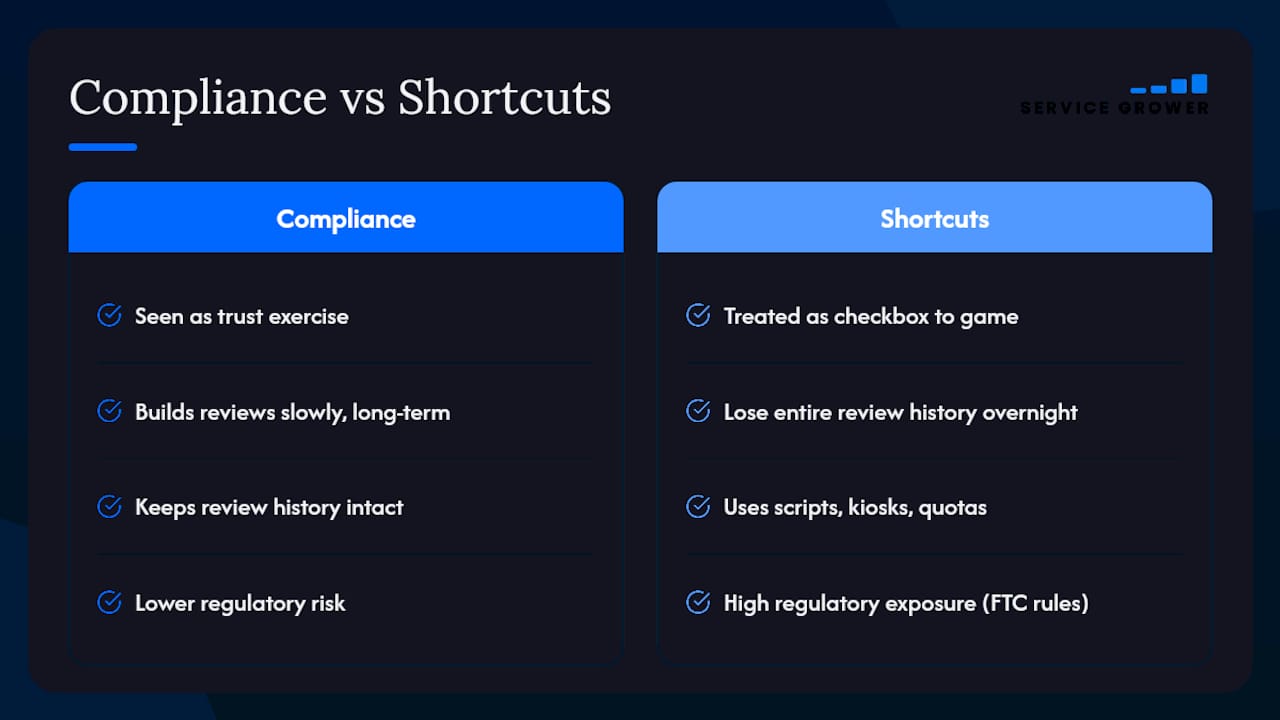
Short-term manipulation, like incentivized reviews or gating, carries real regulatory exposure now that the FTC has finalized rules against fake reviews, not just platform risk. A suspended Business Profile costs you visibility for months. An FTC inquiry costs a lot more.
Audit your current practices this week. If you find a script, a kiosk, or a quota, kill it before Google finds it first.
— Service Grower
Let Service Grower Handle Your Review Program the Right Way
There are alternatives to piecing together a review strategy from multiple tools and guesswork about what Google will flag. Instead, a system can handle request timing, follow-up cadence, and solicitation logs built specifically to stay on the right side of Google’s rules while still generating results.

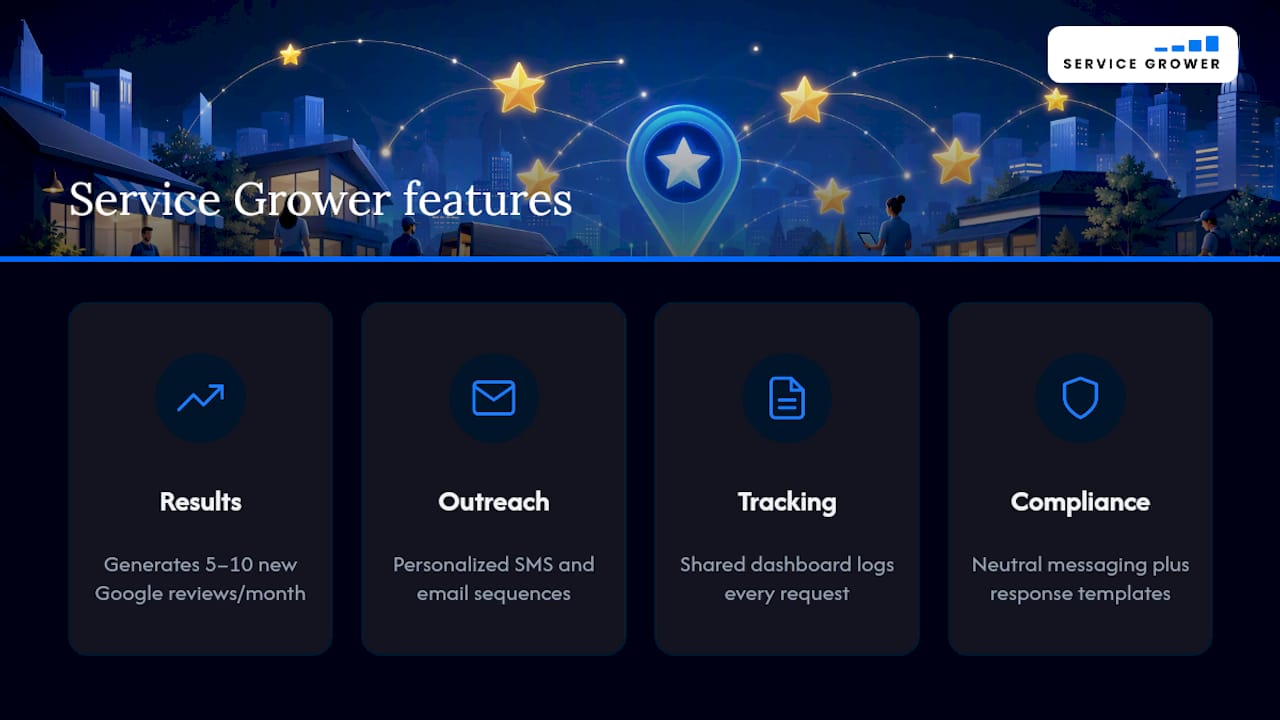
Service Grower’s own workflow is documented to help local businesses generate 5 to 10 new Google reviews a month using neutral, policy-safe outreach rather than incentives or scripts. That means personalized SMS and email sequences timed to avoid on-premises pressure, a shared dashboard to track every request so you have documentation ready if Google ever asks, and negative-review response templates that keep you compliant while protecting your reputation.
If you’re ready to stop guessing whether your current review process violates policy, check out the Service Grower plan to see how the full platform, including AnswerReady™ websites and SmartRequest messaging, fits your business.
Where to Verify These Rules Yourself
Don’t take any policy summary at face value, including this one. Read Google’s Prohibited & restricted content policy directly, check the Business Profile reporting help page before flagging a review, and review the FTC’s guidance on fake reviews for the legal side.
Sources
- Prohibited & restricted content - Maps User Generated Content Policy Help
- Report inappropriate reviews on your Business Profile - Google Business Profile Help
- Federal Trade Commission announces proposed rule banning fake reviews (press release)
FAQ
What Are the Current Rules for Google Reviews?
Reviews must come from real customers describing genuine, first-hand experiences, with no payment, discount, or pressure involved in exchange for posting. Google’s Prohibited & restricted content policy bans incentivized reviews, review gating, on-premises solicitation, and staff-name requests specifically.
Can You Get a Bad Google Review Taken Down?
Only if it violates a specific policy, like spam, profanity, conflict of interest, or off-topic content, not simply because it’s negative. Report it through the Reviews Management Tool, select the matching reason code, and use your one-time appeal if the first report gets denied.
What Changed in Google’s Review Policy for Businesses in 2026?
Google sharpened enforcement around automated pattern detection, meaning sudden review spikes, duplicate accounts, and quota-style staff requests get flagged faster than before. The core rules haven’t changed, but detection and profile-level consequences have gotten more aggressive.
Can an Employer Delete a Google Review?
An employer can’t delete a review directly, but they can report one that violates policy through the Reviews Management Tool for Google to evaluate. Employers and staff also should never post reviews of their own business, since that itself is a policy violation.
How Many Reviews Can I Safely Request Per Month?
There’s no official cap, but steady, spaced-out requests read as organic while sudden bulk requests can trigger automated flags. Service Grower’s workflow, which spaces requests across a 24 to 72 hour follow-up window, is documented to generate 5 to 10 reviews a month without tripping pattern detection.