
 GROWTH GUIDE
20–60 Minute Triage to Stop Wasted Spend on Google Ads Landing Pages
A Google Ads landing page has one job: prove to the visitor, in under three seconds, that it’s the exact answer to what they searched. The single biggest lever is message match paired with one conversion goal. Open the ad you’re running right now and check whether its headline matches the H1 on the page it sends people to. If it doesn’t, fix that before touching anything else.
TL;DR:
- Ensuring message match between ad copy, headline, and CTA is critical for maintaining user trust and improving conversion rates.
- Landing pages should have a single, clear goal and load quickly on mobile devices to maximize engagement and avoid penalties in Quality Score.
- Speed improvements, especially reducing load times by even a second, significantly increase conversion rates on mobile traffic.
- Testing should focus first on headlines and value propositions, with small, incremental changes tracked using the ICE framework for the highest impact.
- Diagnosing common issues involves using Google Ads tools like the Landing pages report and PageSpeed Insights to identify URL, mobile, and speed problems efficiently.
Table of Contents
- What Is a Google Ads Landing Page and Why It Matters
- The Non-Negotiables: Message Match, One Goal, Speed, Mobile, and Proof
- Matching Page Design to Where the Traffic Comes From
- What Should You Test First on a Landing Page?
- How Do You Diagnose Landing Page Problems Inside Google Ads?
- The 20 to 60-Minute Landing Page Triage
- Service Grower’s Perspective on Landing Pages That Actually Convert
- Turn This Checklist Into a Working System
- Sources
What Is a Google Ads Landing Page and Why It Matters
A Google Ads landing page is a standalone page built to convert a specific ad and keyword, not a homepage or a general services page pulling double duty. That distinction is where most campaigns quietly bleed money. A homepage tries to serve everyone: new visitors, returning customers, job seekers, competitors doing research. A landing page serves one person with one intent, and it strips away everything that doesn’t move that person toward a single action.
This matters because Google’s own guidance ties landing page experience directly to Quality Score, and Quality Score directly affects your cost per click. A page that mismatches the ad, loads slowly, or buries navigation in confusing menus gets penalized twice: once in ad rank, once in conversion rate.
Here’s the benchmark to hold yourself against: the median landing page conversion rate sits around 6.6%, based on aggregated Unbounce and Shopify data. That’s a blended number across industries, so treat it as a floor, not a target. A local HVAC or dental page running branded search traffic should often beat it; a cold-traffic awareness campaign might land well under it.
What separates a page above that median from one stuck below it usually comes down to a short list:
- Ad copy, headline, and H1 all say the same thing in the same words
- The page has exactly one conversion goal, not three competing offers
- It loads fast and works cleanly on a phone screen
- It shows proof (reviews, credentials, results) before the visitor has to scroll
Get those four right and you’re already ahead of most advertisers running Google Ads today.
The Non-Negotiables: Message Match, One Goal, Speed, Mobile, and Proof
CXL’s research on landing page performance makes a blunt point: ads and landing pages function as a single system, and sending paid clicks to a generic page is one of the most common reasons campaigns underperform. If someone clicks an ad for “emergency water heater repair” and lands on a page titled “Our Services,” you’ve broken the chain they were following.
Five things have to be true before you spend another dollar on traffic:
- Message match. The exact phrase or promise in your ad copy should reappear in the headline, the H1 tag, and ideally the CTA button text. No paraphrasing, no “creative variation.”
- Single conversion goal. Pick a phone call, a form fill, or a booking. Not all three competing for attention. Pull the main navigation off the page entirely if you can.
- Speed and Core Web Vitals. Aim for Largest Contentful Paint under roughly 2.5 seconds, minimal Cumulative Layout Shift, and an Interaction to Next Paint that stays responsive on mid-range phones.
- Mobile-first layout. Most Google Ads traffic arrives on a phone. Tap targets need real spacing, forms need to autofill correctly, and nothing should require pinch-zooming to read.
- Above-the-fold proof. A star rating, a client logo, a specific number (bookings completed, years in business) belongs in the first screen, not buried below three paragraphs of copy.
Pro Tip: Test your landing page on a phone with one bar of signal, not office Wi-Fi. That’s closer to what a real searcher standing outside a job site or in a parking lot is actually dealing with.
Speed deserves extra weight here because it compounds. Slow load times don’t just frustrate visitors, they actively suppress the conversions you’re paying for on every single click, regardless of how good your copy is.
Matching Page Design to Where the Traffic Comes From
Not every visitor arrives with the same level of intent, and treating them identically wastes both their time and your budget. Traffic temperature describes how ready someone is to act: hot traffic already knows what it wants and just needs a fast path to get it; cold traffic needs to be convinced the problem is worth solving before it cares about your solution.
A visitor who searched “24 hour plumber near me” and clicked your ad is hot. Give that person a short page: a clear hero statement, a phone number or booking button above the fold, and just enough proof to confirm you’re legitimate. Long-form persuasion here actually hurts, because every extra paragraph is friction between the click and the call.
A visitor who clicked a display ad about “signs your HVAC system needs replacing” is cold. That page needs room to work: detailed proof, a breakdown of objections, maybe a short FAQ addressing price concerns, and a softer first step before asking for a big commitment.
Structure your templates around that split:
- Short-form template: hero headline matching the ad, one CTA repeated twice (top and bottom), a handful of trust badges or reviews, minimal scrolling required
- Long-form template: expanded value proposition, case-style proof, objection handling, a multi-step form that starts with an easy question before asking for contact details
That last point matters more than it sounds. Cold and mid-funnel traffic often converts better through micro-commitments, a short quiz, a “get my estimate” multi-step form, a price calculator, than through a single blunt “Contact Us” box. Each small yes builds momentum toward the final one. Hot traffic doesn’t need that scaffolding; it slows them down. Matching page length and proof density to traffic temperature is one of the most overlooked levers in Google Ads landing page optimization techniques, mostly because it’s easier to build one page and send everyone to it.
What Should You Test First on a Landing Page?
Test the headline before you touch the layout. That’s not a stylistic preference, it’s where the data points. Copywriting research on landing page conversion rates shows headline and value-proposition changes typically produce the largest lifts, often in the 50 to 200% range, while CTA wording and placement changes tend to land in the 20 to 50% range. Design tweaks like color and layout usually move the needle the least.
A practical testing order looks like this:
- Headline — does it restate the exact promise from the ad?
- Value proposition — is the “why choose us” argument specific or generic?
- CTA copy and placement — “Get a Free Quote” against “Submit,” button color, and position on the page (see importance of strong CTAs)
- Proof format — star ratings versus written testimonials versus a client logo strip
- Offer structure and form friction — how many fields, what’s asked first, whether there’s a phone-call alternative
Rank candidate tests using the ICE framework: Impact (how much could this move conversions), Confidence (how sure are you based on evidence), Ease (how fast can you ship it). A headline test scores high on all three, which is exactly why it belongs first. The ICE method keeps teams from burning weeks on a button-color test when the real problem is a mismatched headline.
Pro Tip: Run one variable at a time. If you change the headline and the hero image in the same test, you’ll never know which one moved the number.
Basic testing hygiene still trips up experienced marketers. Give a test enough traffic to reach statistical confidence before calling a winner, resist peeking and stopping early, and never run two structural changes on the same page simultaneously. A low-traffic local campaign might need weeks to gather a meaningful sample. Document what you tested and why, then roll the winning version into the next round rather than starting from scratch.
How Do You Diagnose Landing Page Problems Inside Google Ads?
Google Ads already gives you the tools to find most of these problems without guessing. Start with the Landing pages report, found under Campaigns, which breaks performance down by URL and includes columns for Mobile-friendly click rate, Valid AMP click rate, clicks, and CTR. A page with a low mobile-friendly click rate relative to its total traffic is telling you, directly, that phone visitors are hitting friction your desktop testing missed. Google Ads’ own documentation on this report is worth a slow read if you’ve never used it beyond the default view.
Next, run the Test your landing page tool inside Google Ads. It flags specific, fixable issues:
- URL mismatch — your final URL doesn’t match what’s actually rendering; check for tracking parameter errors
- Page unreachable — server errors or expired domains; usually a hosting or DNS issue
- Redirect problems — chained redirects that slow load time or break tracking; Google’s testing tool will list the redirect chain so you can shorten it
Once URL issues are cleared, run the page through PageSpeed Insights and the Google Mobile-Friendly Test. PageSpeed Insights will hand you a Core Web Vitals breakdown with specific culprits, oversized images, unoptimized JavaScript, slow server response. The Mobile-Friendly Test catches layout issues like text too small to read or clickable elements crammed too close together.
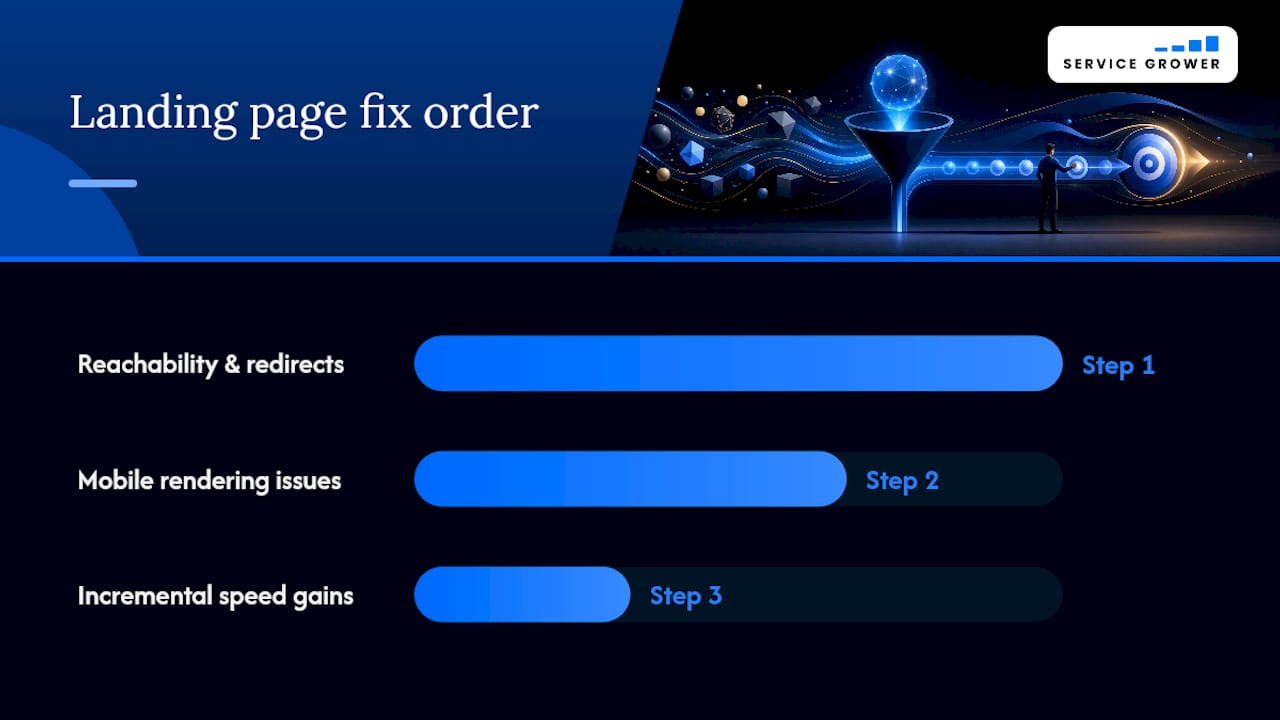
Fix order matters: clear reachability and redirect errors first, since they block traffic entirely, then address mobile rendering, then chase incremental speed gains.
The 20 to 60-Minute Landing Page Triage
You don’t need a redesign to stop losing money on a broken landing page. Run this sequence in order, and stop as soon as you find the blocker, because fixing step one often resolves problems you’d have misdiagnosed at step four.
- Message-match audit (5 minutes). Open your top three ads and compare headline wording against the page’s H1. Rewrite whichever one doesn’t match.
- Mobile and speed triage (15 minutes). Run the page through PageSpeed Insights. Compress oversized hero images and remove any auto-playing video or heavy script first, since those are the fastest wins.
- Remove competing CTAs (10 minutes). Strip the main navigation, delete secondary offers, and confirm there’s exactly one button doing the work.
- Form friction check (10 minutes). Count your form fields. If you’re asking for more than name, phone, and one qualifying question, cut it down. Add a one-line privacy note near the submit button.
- Schedule a headline test (10 minutes). Write one alternate headline, set up the A/B split, and mark a calendar date two to three weeks out to review results with real sample size.
Improving mobile load speed alone can move conversions meaningfully. Google’s Core Web Vitals research has found that shaving even a second off mobile load time raises conversions substantially, which makes step two the highest-leverage fifteen minutes in this entire checklist.
Service Grower’s Perspective on Landing Pages That Actually Convert
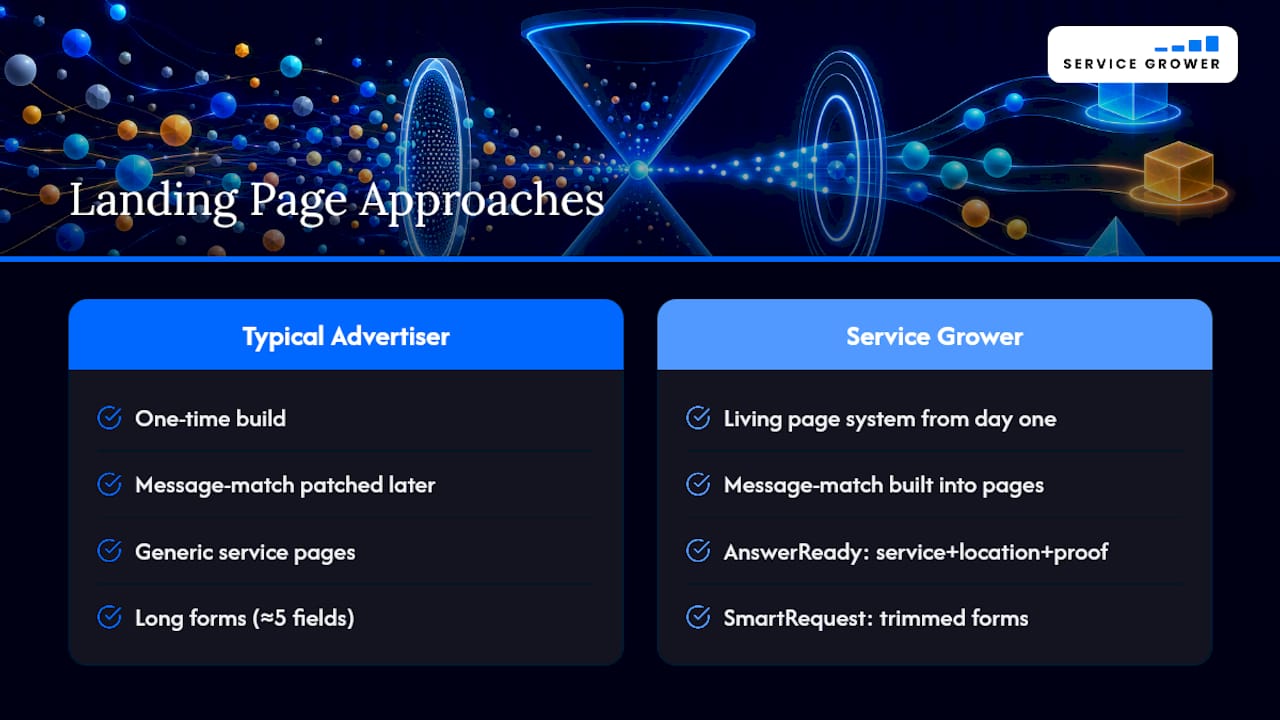
Most advertisers treat landing pages as a one-time build instead of a living part of the campaign. Service Grower’s approach starts from the opposite assumption: message match has to be built into the page system from day one, not patched in after a Quality Score drops.
Our AnswerReady websites are structured so a local business’s core service pages already carry the specific language, location terms, and proof elements that paid search traffic expects to see. SmartRequest booking forms sit on top of that, trimmed down to the fields that actually matter for a phone call or a booked appointment, because a five-field form kills more conversions than a weak headline ever will.
Some businesses run this playbook themselves. Others hand the whole loop, landing pages, forms, and managed Google Ads, to Service Grower and check in monthly. Either way, the standard doesn’t change: one page, one goal, one clear match between what the ad promised and what the visitor sees.
— Service Grower
Turn This Checklist Into a Working System
Reading a diagnostic checklist is useful. Running it against your own campaigns every month is what actually protects your ad spend. Service Grower builds that discipline into the platform itself, so local businesses in HVAC, barbershops, spas, and dozens of other service categories aren’t rebuilding landing pages from scratch every time a campaign underperforms.

AnswerReady websites keep message match baked into every service page automatically, SmartRequest handles the form and booking side without the field bloat that kills mobile conversions, and GrowthView reporting shows which pages are actually earning their ad spend instead of guessing from Google Ads alone. Businesses that pair this with Service Grower’s managed Google and Meta ads skip the trial-and-error phase most advertisers pay for out of their own budget.
If you want a fast read on where your current visibility and landing pages stand, start with the Free AI Visibility Check. It’s a no-cost way to see the gaps before you spend another dollar on clicks that land somewhere that isn’t ready for them. Prefer to talk it through first? Book a 15-minute call and walk through your actual ad account together.
Sources
- Optimize your ads and landing pages - Google Ads Help
- CRO for Landing Pages: A Copywriter’s Playbook | Rob Palmer
- Landing Page Optimization: A Systematic A/B Testing Playbook - Experiment Flow
- Landing Page Optimization Tips for Your Online Store (2026) - Shopify