
 GROWTH GUIDE
Google Ads for Plumbers: A Practical Lead-Gen Playbook
Run targeted Search campaigns alongside Performance Max and Local Services Ads, point every click to a call-first landing page, and set up call tracking before you spend a dollar. That combination is what the data consistently shows works for plumbing businesses trying to generate qualified local leads.
Here’s what you can do in the next 48–72 hours:
- Set a 10–15 mile radius for emergency campaigns and 15–25 miles for general service campaigns, using “presence” targeting only.
- Add call extensions and a click-to-call button to every ad and landing page.
- Create at least one dedicated landing page per service type (emergency, drain cleaning, water heater, etc.) with a three-field form and your phone number above the fold.
- Install call tracking with dynamic number insertion on those landing pages before the campaigns go live.
- Create conversion actions in Google Ads for phone calls (60+ seconds) and form submissions.
Within the first 30 days, watch cost per lead (CPL) above everything else. Once you have 20–30 conversions, shift your attention to lead-to-job conversion rate to understand which campaigns are actually booking work, not just generating calls. Q1 2026 benchmark data puts non-branded plumbing CPL at $183 on average, with Performance Max delivering $82 CPL in the same dataset. That gap is your first optimization target.
Key Takeaways
Running Search + Performance Max + Local Services Ads together, with call tracking and service-specific landing pages in place from day one, is the fastest path to a profitable plumbing Google Ads account.
| Point | Details |
|---|---|
| Launch order | Start with emergency Search campaigns, then add PMax and LSAs as tracking data accumulates. |
| CPL benchmarks | Non-branded search averages $183 CPL; PMax averages $82 CPL in Q1 2026 data. |
| Negative keywords | Build 80+ negatives before launch; grow to 200+ within 90 days to prevent 25–40% budget waste. |
| Landing pages | Dedicated service pages cut CPL from $130+ to $40–$80; match headline to ad copy exactly. |
| Tracking first | Set up call tracking with dynamic number insertion and offline conversion import before spending. |
| Phone pickup | Answering more calls is the highest-ROI optimization available — no ad budget required. |
| Service Grower | Service Grower’s AnswerReady sites, SmartRequest forms, and GrowthView analytics handle the tracking and landing-page infrastructure that makes campaigns profitable. |
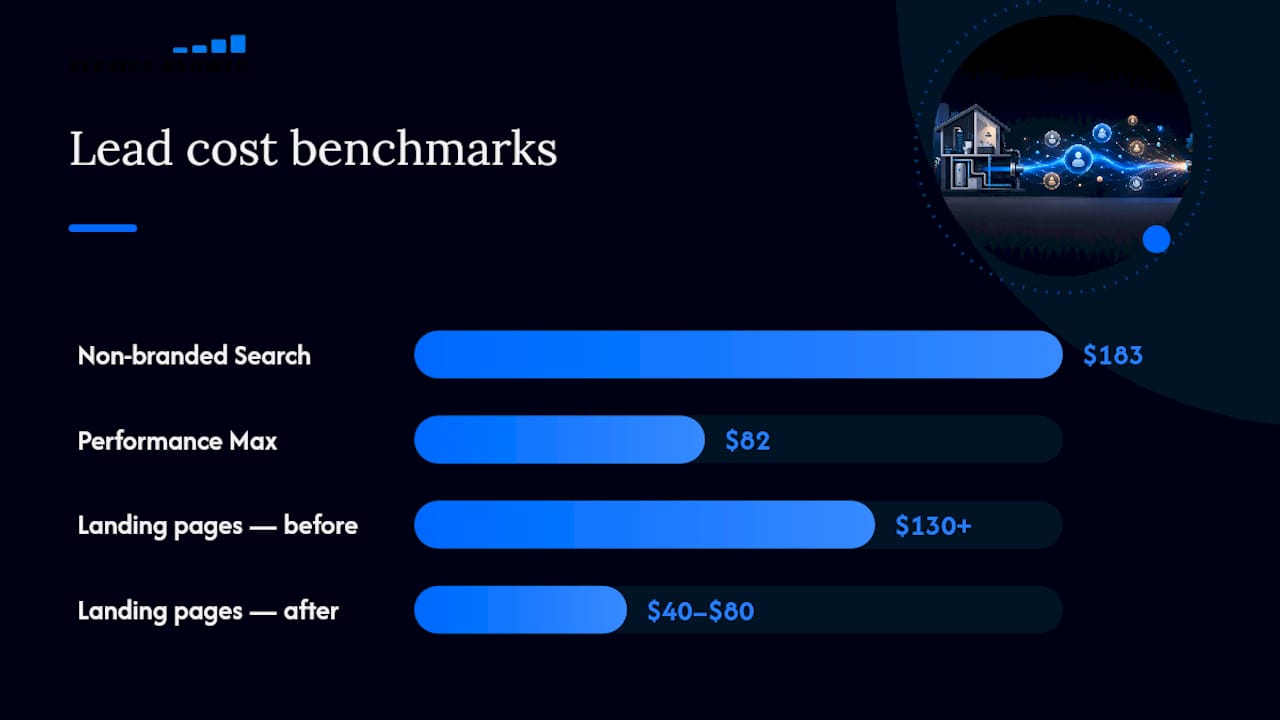
Table of Contents
- Which Google ad types work best for plumbers?
- Conversion tracking setup every plumbing campaign needs
- Keyword strategy, match types, and negative keywords for plumbers
- Ad formats, extensions, and copy that drive phone calls
- Landing pages and booking flows that convert plumbing clicks into booked jobs
- Budgeting, bidding, and how to measure ROI
- Weekly and monthly optimization checklist
- How Service Grower helps plumbers run better Google Ads
- The trade-offs worth knowing before you spend a dollar
- Sources
Which Google ad types work best for plumbers?
The short answer: run Search + PMax + LSAs together where possible. Each one fills a different gap in your lead pipeline.
Search campaigns
Search ads show when someone types a specific query like “emergency plumber near me” or “water heater replacement [city].” You control the keywords, bids, and ad copy. That control matters for plumbing because intent signals are everything: someone searching “burst pipe repair” is ready to call right now. Search campaigns let you bid aggressively on those high-intent terms and pull back on anything that doesn’t convert.
The trade-off is cost. Non-branded search cost per lead (CPL) is commonly at a higher level, requiring careful management of match types and negative keywords to control costs.
Performance Max (PMax)
PMax runs across Search, Display, YouTube, Gmail, and Maps from a single campaign. You supply creative assets and conversion goals; Google’s automation handles placement and bidding.
The catch is control. You can’t see keyword-level data the way you can in Search, which makes it harder to diagnose problems. PMax works best once you have clean conversion data feeding it, so set up tracking first.
Local Services Ads (LSAs)
LSAs appear above standard paid search results and show your Google Guarantee badge, star rating, and phone number. You pay per lead, not per click, and Google pre-screens the leads before charging you. For plumbers with a verified Google Business Profile and strong reviews, LSAs often deliver the lowest CPL of the three formats.

The limitation: not every market has LSAs available for plumbing, and you need to pass Google’s background check and license verification to participate.
Display and remarketing
Display ads alone rarely drive emergency plumbing calls. Where they earn their place is in remarketing: someone visited your water heater page but didn’t call. A low-cost display remarketing campaign keeps your name in front of them while they decide.
When to prioritize each format:
- Immediate emergency calls: Search first, with tight radius and call-only or call-extension ads.
- Scheduled jobs (water heaters, remodels, sewer inspections): PMax with strong creative assets and a dedicated landing page.
- Brand coverage and trust: LSAs where available, plus remarketing for planned-service audiences.
Conversion tracking setup every plumbing campaign needs
Bad tracking is the single most expensive mistake in plumbing PPC. Without it, Google’s bidding algorithms optimize toward the wrong signals, and you can’t tell which campaigns are actually booking jobs.
Set things up in this order:
- Install call tracking with dynamic number insertion (DNI). A call-tracking platform swaps your phone number on the landing page based on the ad source, so every call is attributed to the campaign, ad group, and keyword that drove it. Set the minimum call duration for a conversion at 60 seconds — shorter calls are usually wrong numbers or hang-ups.
- Add the Google Ads conversion tag to your landing pages. This fires on form submissions and, if you’re using Google’s forwarding numbers, on calls from ads. Confirm it’s firing correctly using Google Tag Assistant before launch.
- Create conversion actions in Google Ads for: calls from ads (call extensions), calls from the website (via DNI), and form submissions. Label each one separately so you can see which source drives the most booked jobs.
- Connect offline conversions from your CRM. When a lead becomes a paying customer, import that outcome back into Google Ads using the Google Click ID (GCLID). This is what lets you calculate true ROAS. The SearchLight benchmark dataset puts median cost per paying customer at $333, a figure you can only verify if your offline import is working.
- Link Google Ads to Google Analytics 4. This gives you session-level data alongside conversion data, which helps diagnose landing-page problems.
Pro Tip: Before you launch, use Google’s Tag Assistant and the Google Ads conversion diagnostic tool to fire a test conversion on each action. Double-counting is the most common setup error: if your call-tracking platform AND Google’s forwarding number both fire on the same call, you’ll see inflated conversion counts and your bidding strategy will overpay. Pick one source of truth per conversion type and disable the other.
Keyword strategy, match types, and negative keywords for plumbers
The goal is to capture high-intent searches while blocking everything that wastes budget: job seekers, DIY researchers, and people outside your service area.
Keyword groups to build
- Emergency intent: “emergency plumber,” “burst pipe repair,” “plumber open now,” “24 hour plumber [city]”
- Service-specific: “water heater replacement,” “drain cleaning service,” “sewer line repair,” “toilet repair near me”
- Location + service: “[city] plumber,” “plumber in [neighborhood],” “[zip code] drain cleaning”
- Branded: your business name and common misspellings
Keep branded keywords in a separate campaign. They’re cheap, they convert well, and mixing them with non-branded terms distorts your CPL data.
Match types
Use phrase match as your default for service and location terms. It gives Google enough flexibility to catch natural language variations (“plumber near downtown [city]”) without opening the floodgates to unrelated queries. Add exact match for your highest-converting, highest-intent terms like “emergency plumber [city]” — these you want to control precisely.
Broad match is risky without strong negative lists. If you use it at all, pair it with a well-developed negative keyword list and review the search term report weekly.
Negative keywords
Start with at least 80 negatives before launch. Practitioners report that without aggressive negative keyword lists, a substantial portion of budget can be wasted on irrelevant traffic, sometimes estimated between about a quarter to two-fifths of spend. Common starter negatives:
- Job/career terms: “jobs,” “careers,” “hiring,” “apprentice,” “salary,” “how to become”
- DIY terms: “how to fix,” “DIY,” “repair myself,” “YouTube,” “tutorial”
- Price-shopping terms: “free,” “cheap,” “cheapest,” “low cost” (unless you compete on price)
- Unrelated services: “electrician,” “HVAC,” “roofing,” “locksmith”
- Product-only searches: “plumbing parts,” “pipe fittings,” “Home Depot plumbing”
Review the search term report every week and add new negatives. Most accounts hit 200+ negatives within 90 days.
Campaign structure
Split into 4–6 campaigns by service type: emergency services (largest budget share, 24/7 scheduling), drain cleaning, water heater, general plumbing, sewer/line work, and branded. This structure lets you control bids and budgets per service, which matters because emergency calls are worth more than a routine drain cleaning inquiry.
Ad formats, extensions, and copy that drive phone calls
For plumbing, the phone call is the conversion. Every format and extension decision should point toward making it easier to call.
Format choices
Call-only ads show only on mobile and replace the headline with your phone number. They’re ideal for emergency campaigns where the only action you want is a call. The downside: no landing page visit, so you lose the ability to show reviews or service details before the call.
Responsive Search Ads (RSAs) give you up to 15 headlines and 4 descriptions; Google tests combinations and serves the best-performing mix. Use RSAs as your primary format in non-emergency campaigns where you want to communicate more than just “call now.”
PMax creative assets need strong headlines, descriptions, images, and a logo. For plumbing, use real photos of your team and trucks, not stock images. Google’s algorithm favors asset variety, so supply the maximum number of assets.
Extensions to add on day one
- Call extensions: your primary phone number, scheduled to show during business hours (or 24/7 for emergency campaigns).
- Location extensions: linked to your Google Business Profile, showing your address and service area.
- Sitelink extensions: link to specific service pages (“Water Heater Repair,” “Emergency Plumbing,” “Drain Cleaning,” “Get a Free Estimate”).
- Callout extensions: short trust phrases like “Licensed & Insured,” “Same-Day Service,” “No Overtime Charges,” “Free Estimates.”
- Structured snippets: list your services under the “Services” header: “Drain Cleaning, Water Heater Repair, Sewer Line Inspection, Emergency Plumbing.”
Copy that converts
For emergency ads, lead with availability: “Available Now — Call in 60 Seconds” or “Emergency Plumber, [City] — We Answer 24/7.” Don’t bury the availability claim in the second headline.
For planned services, financing and trust signals close more leads: “Water Heater Replacement — Financing Available — Licensed & Insured.”
For emergency campaigns, run 24/7. For planned-service campaigns, you can reduce bids during overnight hours when call pickup is unlikely.
Landing pages and booking flows that convert plumbing clicks into booked jobs
A well-built landing page can cut CPL from $130+ down to $40–$80, according to reported case data from structured campaigns. The page has one job: get the visitor to call or submit a form before they leave.
Above the fold (what they see without scrolling)
- Headline that matches the ad: if the ad says “Emergency Plumber in [City],” the page headline should say the same thing, not “Welcome to [Business Name].”
- Large, tappable phone number with a click-to-call link. On mobile, this is the most important element on the page.
- Three-field form: name, phone, and service needed. Nothing else. Every additional field reduces submissions.
- Trust signals: star rating with review count, license number, and years in business.
Mobile-first requirements
- Single-tap call button, sticky at the top or bottom of the screen as the user scrolls.
- Page load under two seconds. Use Google PageSpeed Insights to check. Slow pages kill emergency conversions.
- No pop-ups that block the phone number or form.
Content blocks below the fold
For emergency pages: a brief “How it works” section (call, we dispatch, problem solved), service area map or list of neighborhoods served, and a handful of recent Google reviews.
For planned-service pages: service details, before/after photos, financing options, and a FAQ section targeting common objections (“How long does a water heater replacement take?”).
Tracking on the page
Each landing page should display a dynamically swapped phone number tied to your call-tracking platform. When a visitor calls that number, the call is attributed to the specific campaign and keyword that brought them. Confirm the dynamic number insertion script is loading before the page renders, not after, or you’ll see calls attributed to “direct” instead of the correct campaign.

Budgeting, bidding, and how to measure ROI
Benchmark ranges
Calculating your acceptable CPL
Work backward from your numbers. A CPL of $80–$100 leaves healthy margin; a CPL of $183 still works if your close rate is strong. The formula: Acceptable CPL = Average ticket × Close rate × Margin.
Bidding strategy by stage
- Weeks 1–4 (data collection): Use Manual CPC or Maximize Clicks with a bid cap. You need conversion data before automated bidding can work properly.
- After 20–30 conversions: Switch to Maximize Conversions. Let Google optimize toward your conversion actions.
- After 50+ conversions: Test Target CPA (tCPA) set at your acceptable CPL. This is where PMax tends to outperform manual Search management.
For budget, the internal budgeting guide recommends starting with a test budget that can generate at least 10 clicks per day per campaign. At $10.49 average CPC, that’s roughly $100–$150/day minimum to generate meaningful data.
KPIs to track
- CPL by campaign and service type
- Cost per paying customer (requires offline import)
- Lead-to-job conversion rate
- ROAS (closed revenue / ad spend, not just lead value)
- Impression share for emergency keywords (aim for 70%+)
Weekly and monthly optimization checklist
Consistency beats occasional deep dives. A 30-minute weekly routine catches problems before they compound.
Weekly tasks
- Pull the search term report and add new negatives to the shared negative list.
- Check call quality: listen to a sample of recorded calls. Are leads qualified? Are calls being answered?
- Review CPL by campaign. Flag any campaign where CPL jumped more than 20% week-over-week.
- Adjust emergency campaign bids for off-hours if call pickup drops at night.
- Check impression share for top emergency keywords. If it’s below 70%, consider a budget increase or bid adjustment.
Monthly tasks
- Review campaign structure. Are any ad groups generating zero conversions after 30 days? Pause or restructure them.
- Reallocate budget toward the campaigns with the lowest CPL and highest lead-to-job conversion.
- Run one A/B test: either a new headline in an RSA or a landing page element (headline, CTA button color, form placement).
- Review the geographic performance report. Are certain zip codes or neighborhoods converting at a lower CPL? Increase bids there.
- Update ad scheduling if call pickup patterns have changed.
Optimization cadence table
| Task | Frequency | Time Required |
|---|---|---|
| Search term report + negatives | Weekly | 20–30 min |
| Call quality review | Weekly | 15–20 min |
| CPL and CTR check | Weekly | 10 min |
| Budget reallocation | Monthly | 30 min |
| A/B test launch | Monthly | 45 minutes |
| Geographic performance review | Monthly | 20 min |
| Campaign structure audit | Quarterly | 60–90 min |
| Competitor ad review | Quarterly | 30 min |
Simple weekly metric log
Track these four numbers every Monday: CPL (this week vs. last week), CTR (by campaign), conversion rate (by landing page), and average CPC. A rising CPC with a flat conversion rate means you’re paying more for the same results, which usually points to a Quality Score problem or increased competition on a keyword.
How Service Grower helps plumbers run better Google Ads
Running Google Ads for a plumbing business means managing call tracking, landing pages, review signals, conversion attribution, and campaign optimization simultaneously. Most small plumbing operations don’t have a dedicated marketing person for all of that.

Service Grower’s platform handles the infrastructure that makes ads work. The AnswerReady website is built for local search and AI visibility, with the technical setup (fast load times, click-to-call, structured data) that landing pages need to convert. SmartRequest booking forms capture leads from both ads and organic traffic in one place. GrowthView analytics ties campaign performance to actual bookings, so you can see cost per paying customer without manually exporting CRM data. And for plumbers who’d rather not manage campaigns themselves, Service Grower’s optional managed Google Ads service handles keyword strategy, bid management, and weekly optimization.
The platform also aggregates and manages customer reviews, which feed directly into the trust signals (star ratings, review counts) that improve both LSA performance and landing page conversion rates. Case studies from Service Grower clients show measurable increases in bookings and inbound reviews after platform adoption.
Book a 15-minute call to see how the platform maps to your current setup, or explore the full platform to understand which features apply to your campaigns first.
The trade-offs worth knowing before you spend a dollar
The conventional advice is to start with Search because it gives you control. That’s not wrong, but it misses something: control is only valuable if you know what to do with it. A plumber running Search for the first time with no negative keyword list and a generic homepage as the landing page will spend $183 per lead and wonder why Google Ads doesn’t work. The format isn’t the problem.
Here’s a more honest framing of the trade-offs:
Search vs. PMax: Search gives you keyword-level visibility and precise control over what triggers your ads. PMax gives you lower CPL ($82 vs. $183 in the Q1 2026 data) but less transparency. The right answer for most plumbing businesses is to run both: Search for emergency terms where you need tight control, PMax for planned services where volume and efficiency matter more than granular oversight.
LSAs: If you’re eligible, add them immediately. You pay per lead, not per click, and the Google Guarantee badge converts skeptical searchers better than any ad copy you can write. The only reason not to prioritize them is eligibility, not cost.
A 60-day execution plan
Weeks 0–2: Build the foundation. Set up call tracking, create service-specific landing pages, install conversion tags, and launch one Search campaign for emergency keywords with manual CPC. Add 80+ negatives before the campaign goes live.

Weeks 3–6: Expand and test. Launch PMax with your best creative assets. Apply for LSAs if you haven’t. Review the search term report twice weekly and add negatives aggressively. After 20 conversions, switch the Search campaign to Maximize Conversions.
Weeks 7–8: Optimize and scale. Identify the two or three campaigns with the lowest CPL and highest lead-to-job conversion. Shift budget toward them. Run your first A/B test on a landing page headline. If your PMax CPL is tracking below your Search CPL, consider increasing PMax budget share.
One thing most guides skip: phone pickup rate directly determines your lead-to-job conversion. A campaign generating 40 leads per month at $80 CPL is a great result. That’s 12 additional jobs from the same ad spend, with no optimization required. Aim to answer every call within three rings during business hours, and set up a clear voicemail with a callback promise for after-hours calls.
Sources
The benchmarks, setup guides, and tactical references used throughout this article: