
 GROWTH GUIDE
Best AI Website Builders: Fast, No-Code Picks for 2026
For most people who want a site up fast without touching code, a handful of AI builders genuinely deliver. Service Grower is the recommended choice for U.S. local businesses that need managed visibility, bookings, and review growth built in from day one. For pure DIY, Wix is the most flexible all-rounder, Framer wins for design-forward projects, and Durable is the fastest path to a live single-page site.
Quick picks by use case:
- Local service businesses (HVAC, barbers, restaurants): Service Grower — AnswerReady™ Websites plus integrated local-search and review management
- General marketing sites: Wix — AI generation plus a full manual editor
- Designer portfolios: Framer — visual polish and design control
- Fastest MVP or one-page listing: Durable — live in minutes
- Lowest cost entry: Hostinger — very low starting price
- Absolute beginners: SITE123 — guided onboarding, no decisions required
Testing by Zapier found that AI builders typically get 70–80% of a basic site done automatically, but leave 20–30% of SEO and content work for manual editing. Plan for that gap before you commit to any tool.
Table of Contents
- What are the best AI website builders right now?
- Per-tool reviews: pros, cons, and who each builder actually fits
- How do AI website builders compare on the dimensions that matter?
- How we tested these AI website builders
- How do you choose the right AI website builder for your project?
- Quick-start steps to build and launch a site with an AI website builder
- Why Service Grower is the recommended choice for U.S. local businesses
- Key Takeaways
- Where AI site builders genuinely help and where human expertise still wins
- A done-for-you local solution worth considering
What are the best AI website builders right now?
| Tool | Best For | Free Tier | Entry Paid | AI Features | Design Control | Export / Code Ownership | SEO & Performance | E-commerce | Integrations | Support |
|---|---|---|---|---|---|---|---|---|---|---|
| Service Grower | Local service businesses (managed) | No | Subscription (contact for pricing) | AnswerReady™ AI-optimized sites, local schema, AI search visibility | Managed; brand-consistent templates | Managed hosting; no DIY export needed | Local schema, Google Business Profile linking, GrowthView analytics | Booking via SmartRequest | Review mgmt, Google/Meta Ads, lead tracking | Managed onboarding, dedicated support |
| Wix | General marketing sites | Yes | ~$17/mo | Conversational AI draft + full editor | High — drag-and-drop + AI | No ZIP export; Wix-hosted | Good meta controls, decent speed | Yes (Wix Stores) | 300+ apps | 24/7 chat, help center |
| Framer | Designer portfolios | Yes (limited) | ~$15/mo | AI layout assist, content generation | Very high — design-first | Publish to Framer CDN; no raw ZIP | Good; fast CDN | Basic | Limited | Docs, community |
| Durable | Fastest MVP / one-page | Yes (limited) | ~$12/mo | Full page from one prompt | Low — minimal editing | No export | Basic meta | No | Minimal | Email, help docs |
| Squarespace | Creative portfolios | No (trial) | ~$16/mo | AI text assist, Blueprint AI | High — polished templates | No export | Strong meta, good speed | Yes (full store) | 40+ integrations | 24/7 email, live chat |
| Hostinger | Lowest-cost sites | No | ~$3/mo | AI builder + content generator | Moderate | No export | Basic SEO tools | Yes (basic) | Limited | 24/7 live chat |
| GoDaddy Airo | Quick site + domain bundle | No | ~$10/mo | AI site draft + GoDaddy ecosystem | Low–moderate | No export | Basic | Yes (basic) | GoDaddy suite | 24/7 phone/chat |
| Jimdo | Cost-conscious starters | Yes | ~$9/mo | AI-guided setup (Dolphin) | Low | No export | Basic | Yes (limited) | Few | Email, help center |
| IONOS | Hosting-first small businesses | No | ~$6/mo | AI site builder | Low | No export | Basic | Yes (basic) | Bundled hosting tools | 24/7 phone/chat |
| 10Web | WordPress + AI | No | ~$10/mo | AI WordPress builder | High (WordPress) | Full WordPress export | Strong (WordPress SEO plugins) | Yes (WooCommerce) | All WordPress plugins | Chat, docs |
| Mixo | Startup landing pages | Yes (limited) | ~$9/mo | AI landing page from prompt | Low | No export | Basic | No | Email capture | |
| Design.com | Fast business sites | Yes (limited) | ~$8/mo | AI site assembly | Moderate | No export | Basic | Yes (basic) | Limited | Email, chat |
| Mobirise | Simple business/landing pages | Yes | ~$149/yr (desktop) | Template-based AI layout | Moderate | Yes — offline/ZIP export | Basic | Yes (basic) | Extensions | Docs, forum |
| Dorik | Small business / portfolios | Yes (limited) | ~$8/mo | AI content generation | Moderate — clean templates | No export | Basic | Yes (basic) | Zapier, webhooks | Chat, docs |
| Pineapple Builder | Modular block editing | Yes (limited) | ~$9/mo | AI block suggestions | Moderate | No export | Basic | No | Limited | |
| Appy Pie | No-code web + app | Yes (limited) | ~$8/mo | AI site + app creation | Low | No export | Basic | Yes (basic) | 300+ via Appy Pie | Chat, email |
| Dora AI | Chat-driven site creation | Yes (limited) | ~$12/mo | Conversational prompt-first | Moderate | No export | Basic | No | Limited | Docs, email |
| Readdy | Basic informational sites | Yes (limited) | ~$7/mo | AI page generation | Low | No export | Basic | No | Minimal | |
| CodeDesign.ai | Developer scaffolding | No | ~$29/mo | AI code + site scaffold | High (code-level) | Yes — code export | Depends on dev | Depends on dev | API access | Email, docs |
| Codia.ai | Developer prototypes | No | ~$19/mo | AI code scaffolding | High (code-level) | Yes — code export | Depends on dev | Depends on dev | API | |
| SITE123 | Absolute beginners | Yes | ~$12.80/mo | Guided AI setup | Low | No export | Basic | Yes (basic) | Limited | 24/7 live chat |
| DreamHost Remixer | Hosted builder with DreamHost | No | Bundled with hosting | Template-based builder | Low | No export | Basic | No | DreamHost tools | Chat, phone |
| DreamHost Liftoff | Managed launch with DreamHost | No | Custom pricing | Managed AI-assisted launch | Managed | Managed | Managed | Depends on plan | DreamHost ecosystem | Dedicated |
Pricing reality check: Free tiers exist on Wix, Framer, Jimdo, Mobirise, Mixo, Dorik, Pineapple Builder, Appy Pie, Dora AI, Readdy, and SITE123, but most cap bandwidth, remove custom domains, or show platform branding. Paid entry tiers run roughly $3–$17/month for self-serve tools. Managed solutions like Service Grower and DreamHost Liftoff are priced on subscription or custom quotes. Comparison guides consistently show that budget hosts (Hostinger, IONOS) win on raw price but give up design control and AI depth.
Export flag: Only Mobirise, CodeDesign.ai, and Codia.ai offer meaningful code or ZIP export. 10Web gives you a full WordPress install you can migrate anywhere. Every other tool on this list is hosted-only, which means switching later requires rebuilding. Verify whether a builder provides ZIP export, headless API access, or just migration tools — these represent very different levels of portability and vendor lock-in risk.
For contact and lead-capture forms embedded in AI-built sites, Jotform and Google Forms are the fastest free-to-low-cost options. When workflows get complex — multi-step logic, payment collection, regulated data — Formstack’s AI-powered forms handle enterprise-grade requirements that most AI builders’ native forms cannot match. Zapier’s form builder roundup is a useful reference for matching form tools to automation needs.
Per-tool reviews: pros, cons, and who each builder actually fits
Service Grower
Service Grower is not a DIY site builder — it’s a managed SaaS platform that builds and maintains AI-optimized websites for U.S. local businesses. The AnswerReady™ Website is structured for local search and AI engine discovery (Google, ChatGPT), not just visual appeal. SmartRequest handles online booking and lead forms; GrowthView delivers analytics on visibility and conversions; and the platform manages Google and Meta Ads as an optional add-on.
Pros: Integrated local schema and Google Business Profile linking; review and reputation management built in; no DIY maintenance burden; designed specifically for service businesses (HVAC, barbers, restaurants, fitness, healthcare).
Cons: Not a self-serve tool — requires a subscription and onboarding; pricing is not publicly listed as a flat monthly rate; not the right fit if you want to build and own the code yourself.
Best for: Local service businesses that need more than a pretty page — they need to show up when someone searches “HVAC near me” on Google or asks ChatGPT for a recommendation.
Wix
Wix pairs a mature drag-and-drop editor with a conversational AI that generates a site draft from a short description. The AI layer is genuinely useful for getting a starting point, but Wix’s real strength is what happens after: you can reshape almost anything without touching code.
Pros: Huge template library; strong app market (300+ integrations); full e-commerce with Wix Stores; reliable 24/7 support.
Cons: No code export; monthly costs add up at higher tiers; AI draft quality varies by industry.
Best for: Small business owners who want AI to start the site but expect to spend time customizing it themselves.
Framer
Framer targets designers who want pixel-level control and a fast publish pipeline. Its AI tools assist with layout suggestions and content generation, but the editor itself is where Framer earns its reputation.
Pros: Exceptional design control; fast CDN publishing; clean CMS for content-driven pages.
Cons: Steeper learning curve than most AI builders; limited e-commerce; integrations are thin compared to Wix.
Best for: Portfolios, agency sites, and product landing pages where visual quality is the primary goal.
Durable
Type a business name and category, and Durable returns a complete single-page site in roughly 30 seconds. That speed is the whole pitch.
Pros: Fastest time-to-live of any tool tested; clean output for simple listings; low entry price.
Cons: Very limited customization; no e-commerce; SEO controls are minimal; one-page only.
Best for: A quick placeholder or MVP listing while a more complete site is being built.
Squarespace
Squarespace’s Blueprint AI walks users through style, layout, and page selection before generating a draft. The templates are consistently the best-looking out of the box on this list.
Pros: Best default design quality; strong e-commerce (Squarespace Commerce); solid SEO meta controls; 24/7 support.
Cons: No free tier (14-day trial only); no code export; pricier than budget alternatives.
Best for: Creative businesses, photographers, and retailers who prioritize brand presentation.
Hostinger
Hostinger bundles an AI site builder with its hosting plans at prices that undercut almost every competitor. The AI generates copy and layout from a short prompt.
Pros: Lowest entry price on the list; includes hosting and domain; 24/7 live chat.
Cons: AI output is basic; design control is limited; not suitable for complex sites.
Best for: Experiments, side projects, or businesses that need a functional web presence for the minimum possible spend.
GoDaddy Airo
GoDaddy Airo wraps AI site generation inside GoDaddy’s domain and hosting workflow. If you’re already buying a domain from GoDaddy, Airo reduces the setup friction considerably.
Pros: Domain, hosting, and site in one purchase flow; AI generates a draft quickly; 24/7 phone and chat support.
Cons: Design output is generic; limited customization; no export.
Best for: Users who want everything from one vendor and aren’t concerned about design differentiation.
Jimdo
Jimdo’s Dolphin AI asks a few questions and assembles a starter site. The free tier is functional, and paid plans stay affordable.
Pros: Genuine free tier; low-cost upgrades; simple enough for non-technical users.
Cons: Very limited design flexibility; AI output is basic; integrations are sparse.
Best for: Cost-conscious small businesses that need a starter web presence with minimal investment.
IONOS
IONOS leads with hosting and bundles a simple AI builder. The site creation experience is straightforward, and the bundled hosting keeps total cost low.
Pros: Bundled hosting value; low price; 24/7 phone and chat.
Cons: AI features are thin; design control is limited; not suitable for growth-stage sites.
Best for: Small businesses that already trust IONOS for hosting and want to add a basic site without switching vendors.
10Web
10Web uses AI to build WordPress sites, which means the output is a real WordPress install — with all the plugin flexibility and export portability that implies.
Pros: Full WordPress export; WooCommerce for e-commerce; access to the entire WordPress plugin ecosystem; strong SEO via Yoast or Rank Math.
Cons: Requires WordPress familiarity; more setup than pure AI builders; higher learning curve.
Best for: Users who want AI speed to launch but need WordPress’s long-term flexibility and plugin depth.
Mixo
Mixo generates a startup-style landing page from a one-sentence description, with a built-in email capture form. It’s built for founders validating ideas, not for building full sites.
Pros: Extremely fast for landing pages; email list capture built in; founder-focused templates.
Cons: No multi-page support at entry tier; no e-commerce; very limited customization.
Best for: Startup founders who need a “coming soon” or waitlist page live today.
Design.com
Design.com assembles a business site quickly using AI, with a focus on getting something presentable online fast. Templates skew toward service businesses and local shops.
Pros: Fast setup; business-focused templates; basic e-commerce included.
Cons: Limited AI depth; design control is moderate; integrations are thin.
Best for: Small businesses that want a straightforward site without a lot of configuration.
Mobirise
Mobirise is a desktop-based builder that generates layouts from templates and lets you export the finished site as a ZIP file. That export capability is rare and valuable.
Pros: ZIP code export; offline editing; one-time pricing option; no monthly lock-in.
Cons: AI features are template-driven rather than generative; requires manual hosting setup after export; less polished than cloud-native builders.
Best for: Users who want to own their code and host it anywhere, or who prefer working offline.
Dorik
Dorik offers clean, minimalist templates with AI content generation and Zapier integration for connecting to external tools.
Pros: Clean design output; Zapier and webhook support; affordable entry price.
Cons: No code export; AI features are limited to content generation; e-commerce is basic.
Best for: Small business landing pages and portfolios where simplicity and clean design matter more than feature depth.
Pineapple Builder
Pineapple Builder uses a block-based editor where AI suggests content for individual blocks. It suits users who like modular, section-by-section control.
Pros: Block editor gives granular control; AI content suggestions per block; free tier available.
Cons: No e-commerce; integrations are limited; not suitable for complex sites.
Best for: Users who prefer building page-by-page rather than accepting a full AI draft.
Appy Pie
Appy Pie covers both website and mobile app creation in a no-code environment, with AI assisting in both.
Pros: Web and app creation in one platform; 300+ integrations via Appy Pie Connect; accessible free tier.
Cons: Design quality is below average; AI output is basic; not suitable for design-conscious projects.
Best for: Basic web presences where the priority is also having a companion mobile app.
Dora AI
Dora AI builds sites through conversational prompts — you describe what you want in plain language and the AI iterates.
Pros: Chat-first interface is intuitive; good for users who dislike template browsing; produces visually interesting outputs.
Cons: No e-commerce; limited integrations; no export; still maturing as a platform.
Best for: Users who prefer describing their site in words rather than selecting from menus.
Readdy
Readdy generates simple business pages quickly. The interface is minimal and the output is functional rather than distinctive.
Pros: Fast; simple; low price.
Cons: Very limited customization; no e-commerce; minimal integrations.
Best for: Basic informational pages for small businesses that need something live quickly.
CodeDesign.ai
CodeDesign.ai generates site scaffolding and code that developers can take and refine. It’s not a no-code tool.
Pros: Code export; developer-oriented output; useful for teams that want AI to handle boilerplate.
Cons: Requires development skills to use effectively; higher price than no-code alternatives.
Best for: Developers or small dev teams that want AI to scaffold a site they’ll customize in code.
Codia.ai
Similar to CodeDesign.ai, Codia.ai focuses on AI-assisted code generation for prototypes and site scaffolding.
Pros: Code export; API access; useful for rapid prototyping.
Cons: Not a no-code tool; requires technical skills; limited design templates.
Best for: Developers building prototypes who want AI to handle the initial structure.
SITE123
SITE123 walks beginners through every decision with a guided setup flow. There’s almost no way to get stuck.
Pros: Guided onboarding; 24/7 live chat; basic e-commerce; free tier.
Cons: Very limited design flexibility; no export; AI features are minimal.
Best for: First-time site builders who want hand-holding through every step.
DreamHost Remixer and DreamHost Liftoff
DreamHost Remixer is a template-based hosted builder bundled with DreamHost hosting plans. DreamHost Liftoff is a managed launch service where DreamHost’s team helps set up and launch the site. Remixer suits existing DreamHost customers who want a quick site without switching tools; Liftoff is for users who want a managed experience with DreamHost’s team involved. Neither offers code export, and both are best understood as hosting-adjacent site tools rather than standalone AI builders.
How do AI website builders compare on the dimensions that matter?
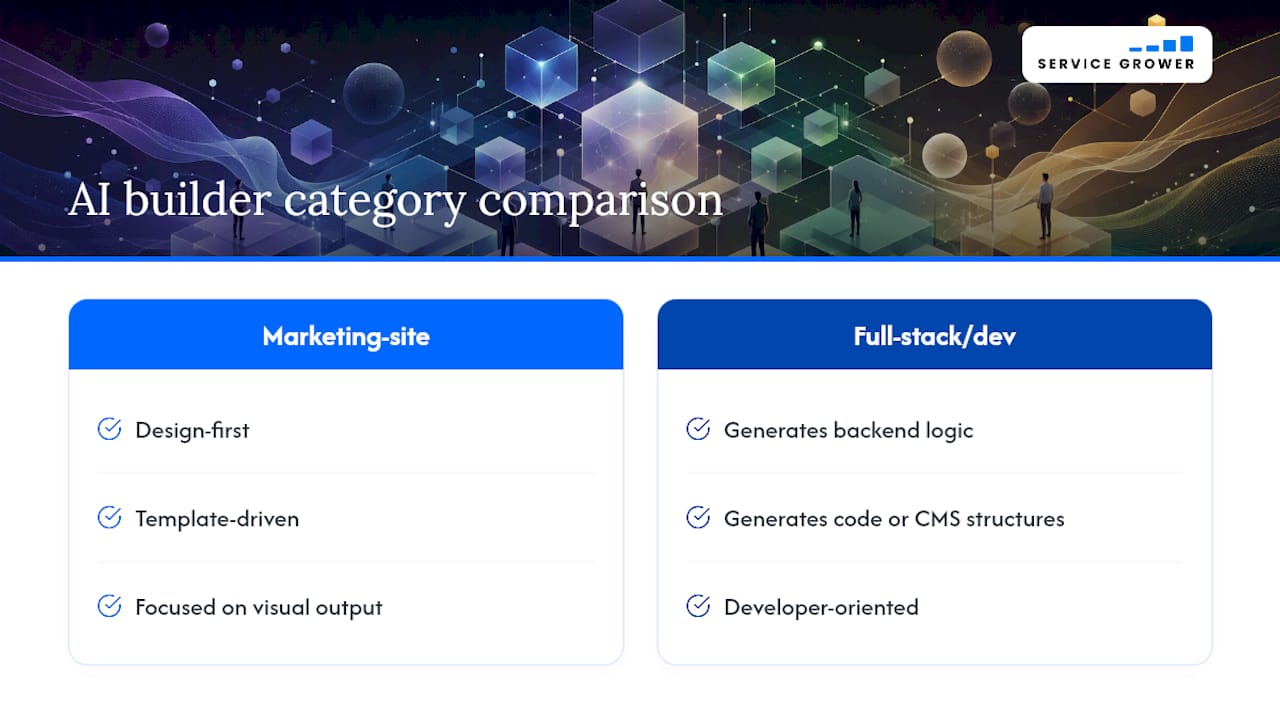
AI site builders split into two broad categories: marketing-site builders (design-first, template-driven, focused on visual output) and full-stack or developer-oriented builders (which generate backend logic, code, or CMS structures). Choosing the wrong category is the most common mistake buyers make.
Speed vs. depth tradeoff
Durable, Mixo, and Readdy sit at the speed-first end. They get something live in minutes but leave little room to grow. Wix, Squarespace, and 10Web sit at the depth end: more setup time, but the resulting site can scale, add e-commerce, and connect to dozens of third-party tools. Framer sits in its own lane — fast to publish, but the depth is in design control rather than feature breadth.
SEO and local search
Most AI builders give you basic meta title and description fields. That’s the floor, not the ceiling. For local businesses, what actually drives discovery is structured data (local schema), Google Business Profile integration, and fast-loading pages with clear service-area signals. Service Grower builds those elements in by design. On self-serve tools, you’ll need to add local schema manually or via a plugin — straightforward on WordPress/10Web, more limited on Wix, and largely unavailable on speed-first tools like Durable.
E-commerce support
Squarespace Commerce and Wix Stores are the most complete e-commerce options among the self-serve builders. 10Web pairs with WooCommerce for full inventory and payment control. Hostinger, GoDaddy Airo, IONOS, and SITE123 offer basic store functionality. Durable, Mixo, Framer, Dora AI, Pineapple Builder, Readdy, and Codia.ai have no meaningful e-commerce at entry tiers.
Forms and integrations
A site without a working contact or booking form is a missed conversion. Google Forms is the fastest free embed for simple data collection. Jotform adds conditional logic, payment collection, and broad integrations. For regulated or enterprise workflows, Formstack’s AI-powered forms handle multi-step logic and compliance requirements that native builder forms can’t touch. Wix and Appy Pie have the broadest native integration libraries; most other builders rely on Zapier or webhooks for third-party connections.
Use-case matrix:
| Project type | Best builder category | Top picks |
|---|---|---|
| Local service page (managed) | Managed SaaS | Service Grower |
| General marketing site | Full-featured builder | Wix, Squarespace |
| Designer portfolio | Design-first | Framer |
| Quick MVP / placeholder | Speed-first | Durable, Mixo |
| WordPress-based site | AI + WordPress | 10Web |
| Developer prototype | Code-oriented | CodeDesign.ai, Codia.ai |
| Absolute beginner | Guided builder | SITE123, Jimdo |
| Lowest cost | Budget host builder | Hostinger, IONOS |
How we tested these AI website builders
The test project was a small local service business site: a homepage, a services page, a contact page with a form, and basic on-page SEO. That structure reflects what most readers in this audience actually need to build.
- Form functionality: — Tested the native contact form and noted whether third-party form tools (Jotform, Google Forms, Formstack) could be embedded.
Testing was conducted and updated in 2026. Zapier’s methodology for AI builder roundups informed the metrics used here, particularly the time-to-launch and SEO-completeness checks.
How do you choose the right AI website builder for your project?
Start with your primary constraint, not your wish list.
Priority checklist:
- Local SEO needs: If customers find you through “near me” searches or AI assistants, you need local schema, Google Business Profile integration, and fast mobile load times. Most self-serve builders don’t handle this automatically.
- Speed of launch: If you need something live today, Durable or Mixo will get you there. If you can spend a few hours, Wix or Squarespace produce a more complete result.
- Export and ownership: If you might switch platforms in two years, only choose a tool that exports code (Mobirise, CodeDesign.ai, Codia.ai) or a full CMS install (10Web/WordPress). Every other tool on this list means rebuilding from scratch if you leave.
- E-commerce: If you’re selling products now, start with Squarespace Commerce or Wix Stores. Don’t build on a speed-first tool and try to bolt on a store later.
- Integrations: Check whether your CRM, booking tool, or email platform has a native integration before committing. Wix and Appy Pie have the widest native libraries; others depend on Zapier.
- Budget: Free tiers are useful for testing, not for running a real business. Custom domains, SSL, and removed platform branding all require a paid plan on every tool listed.
- Support: If you’re not technical, prioritize tools with 24/7 live chat (Wix, Squarespace, Hostinger, SITE123, GoDaddy Airo, IONOS).
Red flags during a free trial:
- No way to edit meta titles or descriptions without upgrading
- No custom domain on the free tier (expected) but also no domain option on the entry paid tier (a problem)
- Contact forms that send to the platform’s email rather than yours
- No clear answer on what happens to your content if you cancel
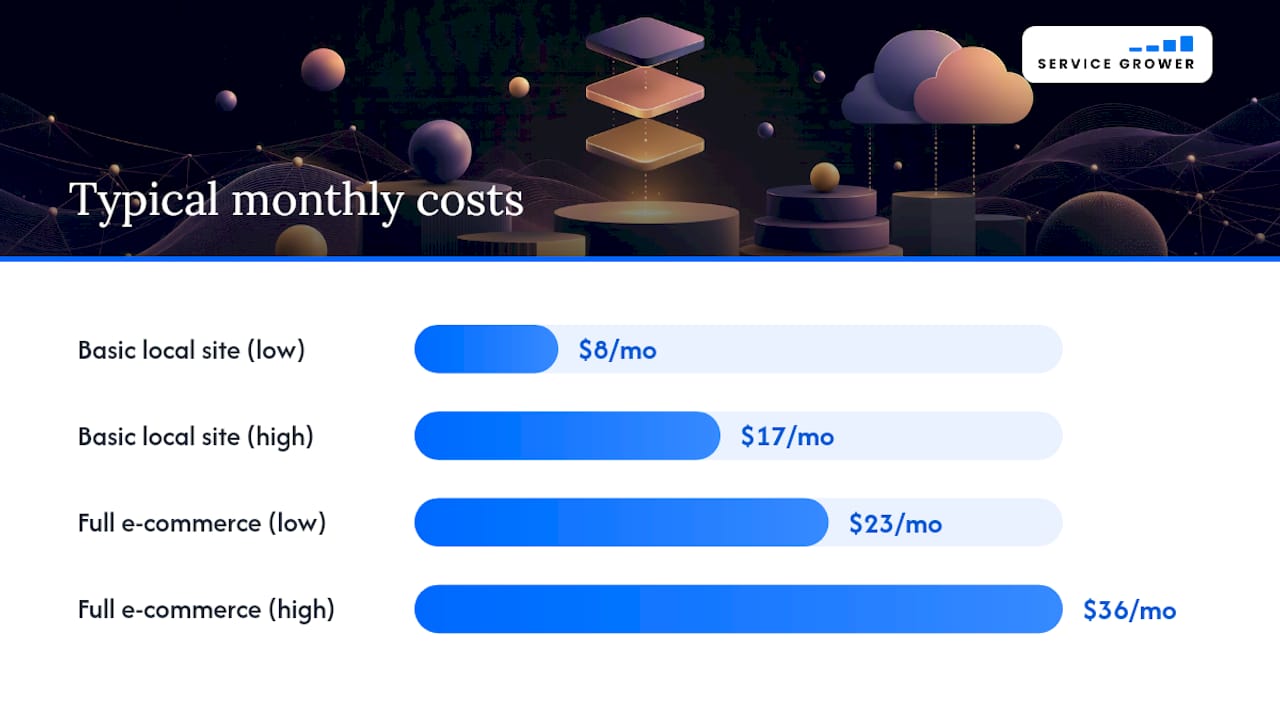
Typical cost ranges: A basic local business site on a self-serve AI builder runs $8–$17/month at the entry paid tier. A full e-commerce setup on Squarespace or Wix runs $23–$36/month. Managed solutions like Service Grower are subscription-based; contact them directly for current pricing.
Quick-start steps to build and launch a site with an AI website builder
- Test your contact form and any payment flow — Submit a test entry and confirm it arrives in your inbox. If you’re using an embedded form from Jotform or another tool, test the full submission-to-notification chain.
Pro Tip: After the AI generates your homepage copy, paste it into a free readability checker (Hemingway Editor works well). If the grade level is above 10, simplify the language. AI-generated copy often reads at a 13th-grade level, which loses readers on mobile before they reach your contact button.
Typical timeline: steps 1–3 take 30–60 minutes; steps 4–6 take another 30–60 minutes; steps 7–8 take 15 minutes. A realistic launch day is 2–3 hours for a simple site, assuming you have your photos and business information ready.
Why Service Grower is the recommended choice for U.S. local businesses
Self-serve AI builders are good at producing a website. They’re not designed to make your business show up when someone searches for your service in your city, asks ChatGPT for a recommendation, or leaves a Google review that builds trust with the next customer.
Service Grower is built for exactly that gap. The AnswerReady™ Website is structured for local search and AI engine discovery from the ground up — local schema, service-area signals, and Google Business Profile integration are part of the build, not afterthoughts. SmartRequest handles online booking and lead capture so you’re not losing customers who visit at 11 PM when you’re not answering the phone. GrowthView gives you visibility into what’s working: where traffic comes from, how many leads convert, and how your review profile is growing.
For businesses that also want paid search, Service Grower manages Google and Meta Ads as an optional add-on, keeping everything in one platform rather than juggling separate vendors.
Book a 15-minute call to see how Service Grower fits your specific business and market.
Key Takeaways
Service Grower is the strongest choice for U.S. local businesses that need managed visibility, bookings, and review growth built in — while Wix, Framer, and Durable lead the self-serve field for general, design, and speed-first needs respectively.
| Point | Details |
|---|---|
| Testing shows that AI builders typically deliver 70–80% of a basic site automatically, but manual editing for SEO and content is still required regardless of which tool you choose. | Expect to spend time on SEO copy and local signals regardless of which tool you choose. |
| Export matters if you plan to switch | Only Mobirise, CodeDesign.ai, Codia.ai, and 10Web offer meaningful portability; every other tool means rebuilding if you leave. |
| Local SEO requires more than a website | Schema, Google Business Profile integration, and booking forms drive local discovery — most DIY builders don’t include these by default. |
| Match the tool to one primary constraint | Speed, design, export, or local SEO — pick the constraint that matters most and choose accordingly. |
| Service Grower for managed local presence | AnswerReady™ Websites, SmartRequest, and GrowthView give local service businesses a managed path to visibility and bookings. |
Where AI site builders genuinely help and where human expertise still wins
AI builders have gotten genuinely good at one thing: producing a consistent, presentable baseline fast. For a business that has no web presence at all, a Wix or Squarespace AI draft is a real upgrade over nothing, and it arrives in an afternoon instead of a month.
Where they fall short is harder to see until you’re already committed. Brand nuance — the specific tone, visual language, and positioning that makes one HVAC company feel different from the next — doesn’t come from a prompt. The AI produces the median version of your industry’s website. That’s fine for a placeholder. It’s a problem if your business competes on differentiation.
Local search optimization is the other gap. Most AI builders treat SEO as a checklist: fill in the meta title, done. But local discovery on Google and increasingly on AI assistants like ChatGPT depends on structured data, consistent NAP (name, address, phone) signals, and a review profile that builds over time. A DIY builder doesn’t manage any of that for you.
The moment to upgrade from DIY to a managed approach is usually when you notice that the site looks fine but the phone isn’t ringing. That’s the signal that the visibility layer is missing, not the design layer. For local service businesses at that point, a managed platform that handles the full stack — site, local schema, reviews, and bookings — produces better outcomes than spending more time tweaking a template.
A done-for-you local solution worth considering
The self-serve tools on this list are real options for businesses that want to build and manage their own site. But if your goal is more customers finding you on Google and AI search, not just a website that exists, the DIY path has a ceiling.

Service Grower handles the full local visibility stack: an AnswerReady™ Website built for AI and Google discovery, SmartRequest for online bookings and lead capture, GrowthView for performance analytics, and optional managed Google and Meta Ads. Local service businesses — HVAC, barbers, restaurants, fitness providers, healthcare practices — get a managed presence that works while they’re focused on running the business, not updating a website. You can read more about the approach on the Service Grower blog or see how local businesses are connecting paid search to their AI-optimized sites with Google Ads for local business.
Book a 15-minute call and find out what a managed local presence looks like for your specific market.
Sources and further reading
| Source | What it covers | Tested / Updated |
|---|---|---|
| Zapier: I Tested 30+ Free AI Website Builders | Time-to-launch testing, SEO completeness, methodology | 2026 |
| Titan: 10 Best AI Website Builders 2026 | Global roundup, price ranges, use-case mapping | 2026 |
| Formstack: Online Form Builder | AI-powered forms, enterprise workflows, multi-step logic | Current |
| Zapier: 13 Best Online Form Builders | Form tool comparison, automation, integrations | Current |
| Jotform: Easiest Online Form Builder | No-code forms, payment collection, integrations | Current |
| Google Forms: Google Workspace | Free embeddable forms, basic data collection | Current |
| Service Grower | Managed AI-optimized websites for U.S. local businesses | 2026 |
This article was tested and updated in 2026. Tool pricing and features change frequently — verify current plans directly with each provider before purchasing.