
 GROWTH GUIDE
Local Business AI Chatbots: Checklist, 2–4 Week Launch Plan, ROI
AI chatbots capture and qualify leads around the clock, and the good ones book appointments straight into your calendar without a human touching the conversation. Add one if you’re losing after-hours inquiries or watching leads go cold overnight. Expect a higher lead capture rate within weeks and a measurable lift in booked appointments once the flows are tuned.
TL;DR:
- Integrating real-time calendar sync and CRM/handoff capabilities significantly improves chatbot efficiency and reduces booking conflicts.
- Custom qualification fields tailored to your service enhance lead quality, but configuration and integration may take several weeks to fully deploy.
- A chatbot that triggers after 30 to 45 seconds on a page feels less intrusive and results in higher engagement and capture rates.
- Pricing varies from free FAQ widgets to advanced, custom API integrations, with mid-tier plans around $30 to $150 monthly offering the best ROI for small businesses.
- Tracking primary KPIs, such as lead capture and booked appointment rates, is essential for measuring and optimizing chatbot performance over time.
Table of Contents
- What AI chatbots actually do for local businesses
- Key features to require when you buy or build a chatbot
- How to set up and launch a chatbot: checklist and timeline
- Costs, tiers, and budgeting for a local-business chatbot
- How to measure chatbot performance and the KPIs that matter
- Why an integrated platform beats a bolted-on chatbot
- Turn chatbot leads into booked customers, automatically
- Sources
What AI chatbots actually do for local businesses
A chatbot on your website is working the graveyard shift you can’t staff. It greets a visitor, asks a few qualifying questions, and either books the job or hands off a warm lead, all while you’re asleep. That matters more than most owners realize: 78% of customers buy from whichever business responds first, and 55% walk away when they can’t get a quick answer. A chatbot removes the wait entirely.
The core jobs break down into four buckets:
- Lead capture and qualification – asking service type, timeline, and budget before a visitor ever picks up the phone
- Appointment booking – checking calendar availability, confirming a slot, and sending reminders that reduce no-shows
- FAQ and light support – answering pricing ranges, service areas, and hours without pulling staff off the floor
- Review prompts – nudging satisfied customers toward a Google review right after a booking confirms
Chatbots can qualify leads and book appointments 24/7, and pushing those qualified leads directly into your CRM and calendar is what separates a real booking tool from a glorified FAQ widget.
A well-configured bot won’t just answer questions. It changes who shows up in your pipeline in the morning, and how many of them are already halfway to booked.
Key features to require when you buy or build a chatbot
Not every chatbot vendor builds the same thing, and the difference between a toy widget and a booking engine comes down to six requirements. Walk into any sales call with this list.
- Two-way calendar sync – real-time integration with Google Calendar, Outlook, or scheduling tools like Calendly and Cal.com, so the bot never double-books a slot
- CRM and email integration – captured leads should land automatically in your CRM or inbox, tagged with source and intent, ready for follow-up automation
- Confidence-based fallback – the bot should recognize when it’s guessing and hand off to a human rather than inventing an answer
- Custom intake fields – qualification questions specific to your service (square footage for HVAC, service tier for a med spa) instead of generic small talk
- Mobile-first behavior – the widget needs to work cleanly on a phone screen, since most local searches happen there
- Proactive trigger rules – a smart appearance timer instead of an instant pop-up that scares visitors off
That fourth point deserves attention most vendors skip. Confidence thresholds on NLP responses matter because a bot that’s 40% sure of an answer shouldn’t give it. It should collect the visitor’s contact info and route to a human before the conversation goes sideways.
Pro Tip: Set your proactive chat trigger to fire after 30 to 45 seconds on a page, or after a specific action like clicking “Pricing.” A bot that pops up the instant someone lands on your site reads as desperate, not helpful.
On security, ask directly who owns the conversation data and whether it’s shared with third parties. A one-paragraph privacy note on the widget itself builds more trust than a buried policy link.
How to set up and launch a chatbot: checklist and timeline
Rushing a chatbot live with no prep is how you end up with a bot that frustrates customers instead of booking them. Follow this sequence instead.
- Define 2 to 3 precise jobs for the bot to do. “Book HVAC service calls” and “capture emergency dispatch requests” work. “Improve customer service” does not.
- Gather your source material: service descriptions, pricing ranges, FAQs, and a handful of real customers emails the bot can learn tone from.
- Connect your calendar and CRM, then set availability windows and buffer times so the bot never books back-to-back jobs with no drive time.
- Design the conversation flows, write honest fallback messages, and stress-test edge cases before anything goes live.
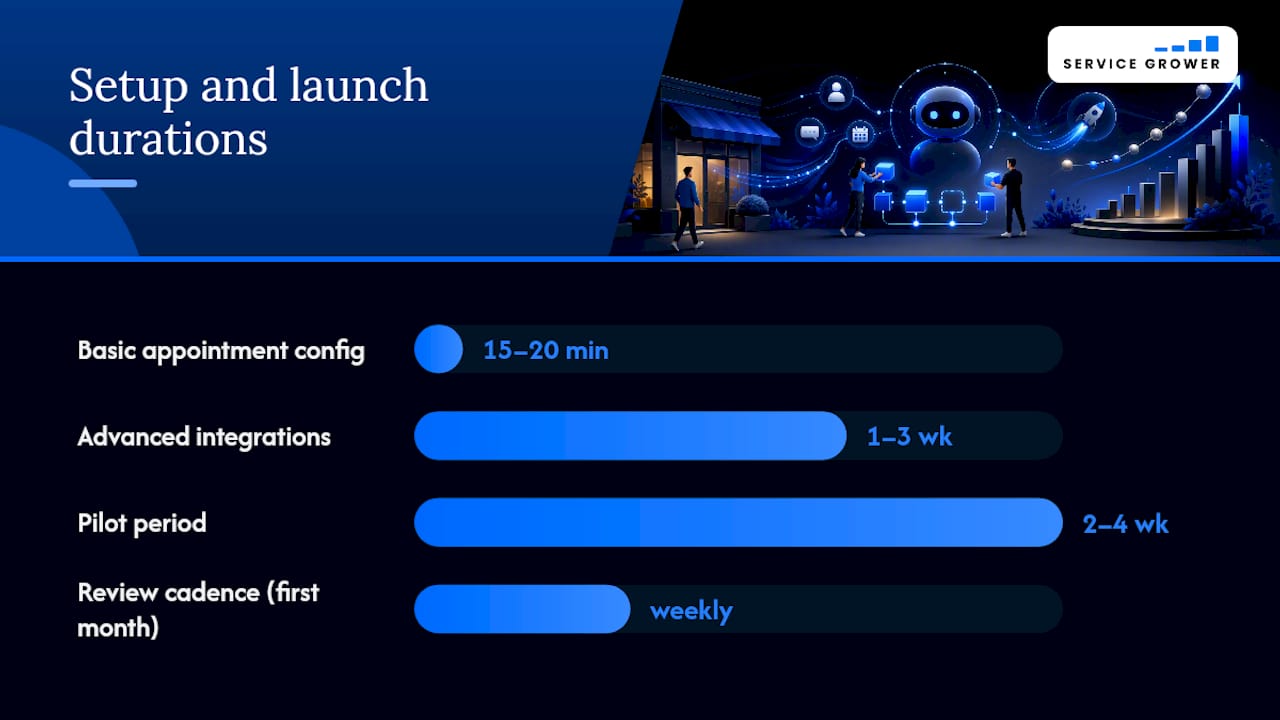
- Pilot for 2 to 4 weeks, watching real conversations closely rather than assuming the bot is working.
Basic appointment types can be configured in 15 to 20 minutes, but advanced integrations with multiple calendars or custom CRM fields typically take one to three weeks. Plan your launch date around the harder number, not the easier one.
Once live, review transcripts weekly for the first month. That’s the fastest way to catch a fallback message that’s routing customers wrong or a question the bot keeps misunderstanding.
Costs, tiers, and budgeting for a local-business chatbot
Chatbot pricing splits into three rough tiers, and the jump between them depends almost entirely on integration depth, not on flashier AI.
- Basic widget: canned FAQ answers and a contact form, often bundled free with website platforms
- Mid-tier AI booking bot: real calendar sync, lead qualification, and CRM handoff, typically running in the $30 to $150 a month range for straightforward setups
- Fully integrated custom build: deep API work, multi-location routing, and advanced NLP training, which pushes costs well beyond that range with one-time setup fees on top
What actually drives the price up isn’t the chat interface. It’s the CRM integration, the calendar complexity, and how much custom training the NLP needs to handle your specific service jargon accurately.
For ROI math, keep it simple: if your average job is worth $200 and the bot books even two extra appointments a month that would’ve otherwise gone unanswered, a $99/month plan pays for itself several times over. Track that number for 60 days before deciding a tier isn’t working.
How to measure chatbot performance and the KPIs that matter
You can’t improve what you don’t track, and most owners stop measuring the moment the bot goes live. Set up tracking before launch, not after.
Primary KPIs worth watching weekly:
- Lead capture rate – percentage of chatbot conversations that end with a name and contact method collected
- Booked appointment rate – how many conversations convert directly into a calendar slot
- Qualified-lead conversion – of the leads the bot captures, how many turn into actual paying jobs
Secondary metrics that reveal why the primary numbers move include average conversation length, the fallback/handoff rate, and any change in no-show rates once automated reminders kick in.
Tag every chatbot session with UTM parameters and set up a distinct CRM lead source labeled “chatbot” so you’re never guessing where a lead came from. Tools built for tracking AI-driven conversions make this cleaner than manual spreadsheet tagging. For the first 30 to 90 days, aim for steady week-over-week improvement in lead capture rate rather than a specific target number. Every service business’s baseline is different, and Service Grower’s free lead check is a fast way to see where your current site stands before you add a bot on top of it.
Why an integrated platform beats a bolted-on chatbot
Most chatbot failures aren’t a bad NLP model. They’re a bot that lives on an island, disconnected from the calendar, the CRM, and the review system, so every captured lead needs a human to manually copy it somewhere else.
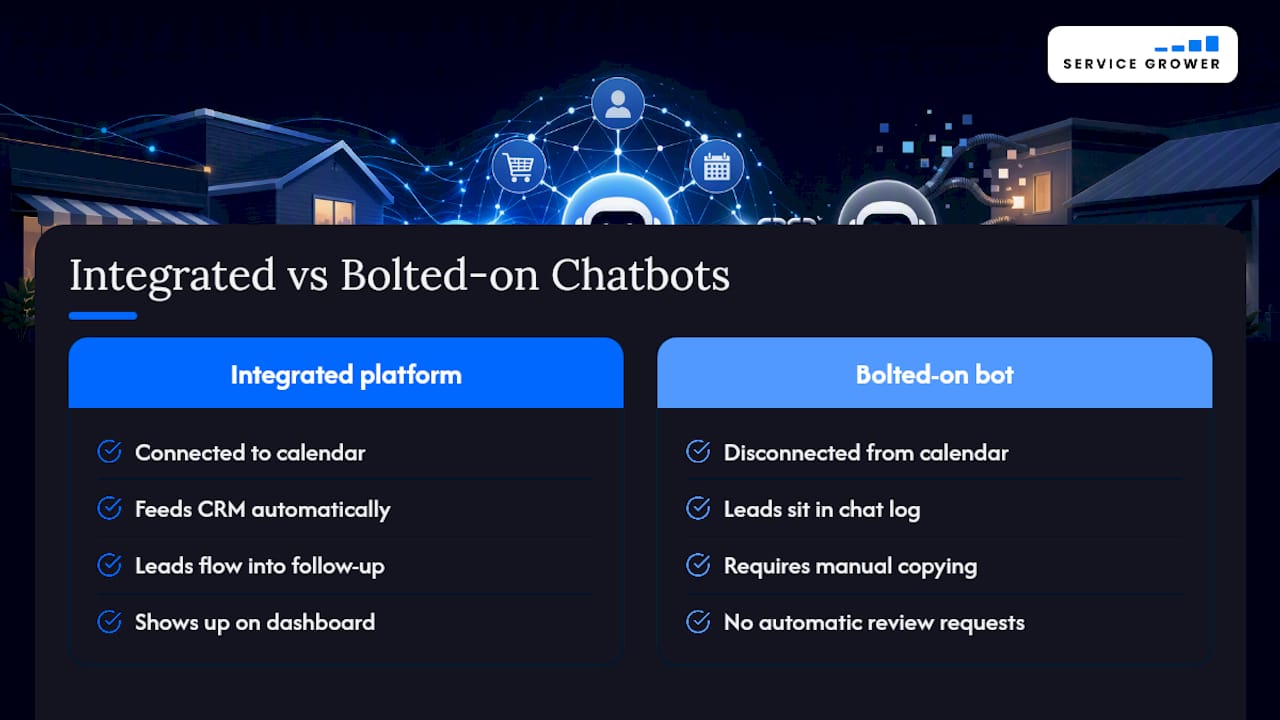
That’s the argument for treating the chatbot as one piece of a connected system rather than a standalone widget. When a booking flow, a lead tracking portal, and review management share the same data, a captured lead doesn’t just sit in a chat log. It flows into follow-up, shows up on a dashboard, and eventually turns into a review request the moment the job closes. Service HVAC companies, med spas, and salons tend to see the fastest return here, since their booking volume is high enough that a few extra captured leads per week compounds fast.
The businesses that struggle are usually the ones running five disconnected tools instead of one that talks to itself.
— Service Grower
Turn chatbot leads into booked customers, automatically
A chatbot that captures a lead is only half the job. If that lead doesn’t land in a system that books it, follows up, and asks for a review afterward, you’re still doing manual work on the back end. Service Grower closes that gap by combining an AnswerReady™ website built to answer AI and search queries directly, a SmartRequest booking flow that syncs to your calendar, and review management that fires the moment a job wraps.

Instead of stitching together a chat widget, a separate booking tool, and a CRM you check manually, Service Grower runs it as one system built for local businesses that need bookings, not another disconnected app. If you want to see exactly where your current site is losing leads before you add a chatbot to the mix, start with a free AI visibility check and get a clear picture of what’s working and what isn’t.
Sources
- How AI Chatbots Can Help Local Businesses Close More Leads
- The Ultimate Guide to Appointment Scheduling Chatbots (2026) | BuiltABot Blog