
 GROWTH GUIDE
Voice, Calendar, Widget, or Managed AI Appointments for Local Businesses
Choose a voice-first AI agent if phone volume drives your bookings, an AI calendar assistant if your staff already lives inside Google Calendar or Outlook, or an embedded booking widget if most of your traffic converts on the web. Local businesses that want all three working together without stitching them themselves typically turn to an integrated platform like Service Grower. Done right, AI appointments mean 24/7 booking coverage, meaningfully fewer no-shows, and hours of staff time back every week.
TL;DR:
- Using an integrated platform like Service Grower allows local businesses to combine multiple AI scheduling tools for seamless booking, reviews, and visibility management.
- Accurate real-time slot locking and live calendar or EHR integration are crucial to prevent double bookings and ensure consistency across channels.
- AI-driven appointment systems can reduce no-shows by 25-30%, recover several appointment slots weekly, and require tracking key KPIs before and after implementation.
- Proper integration with existing systems, compliance with HIPAA or GDPR, and transparent data handling are essential to maintain security and legal standards.
- The best choice depends on business volume and channel focus; vendor evaluation should include live demos of failure scenarios and clear, separate pricing details.
Table of Contents
- What Are AI Appointments and How Do They Differ by Category?
- How Does an AI Appointment System Actually Book a Slot?
- What ROI Should You Expect from AI Scheduling?
- What Integrations and Compliance Checks Should You Require?
- How Do You Evaluate and Choose an AI Appointment Vendor?
- Where Does Service Grower Fit into an Integrated Scheduling Setup?
- What Do AI Appointment Tools Actually Cost?
- Is Your Patient and Customer Data Actually Protected?
- The Real Lesson Behind AI Appointment Adoption
- Get a Clear Picture of Your Current AI Visibility Before You Automate Anything
- Sources
What Are AI Appointments and How Do They Differ by Category?
“AI appointments” is the shorthand people search for, but the industry term is automated appointment scheduling or conversational scheduling AI. It covers any system that lets a computer, not a human receptionist, capture a booking request, check real availability, and confirm a slot. The category splits into four practical buckets, and picking the wrong one is the most common mistake business owners make.
- Voice AI agents answer and make phone calls, handling scheduling conversations the way a receptionist would, including rescheduling and cancellation requests.
- AI calendar assistants live inside Google Calendar, Outlook, or a CRM and manage availability, send reminders, and auto-schedule meetings based on rules you set.
- Embedded booking widgets sit on your website or in a chat window, letting customers self-serve a slot without ever talking to anyone.
- Managed integrated platforms combine two or more of the above with visibility, reviews, and reporting tools so the booking flow isn’t the only thing automated.
| Category | Channels supported | Primary integrations | Best for | Onboarding time | Pricing shape | Compliance posture |
|---|---|---|---|---|---|---|
| Voice AI agent | Phone, sometimes SMS | Telephony/SIP, calendar, EHR | High call volume, healthcare intake | 4-8 weeks | Per-minute or per-booking | Varies; HIPAA-capable options exist |
| AI calendar assistant | Email, calendar invites | Google Calendar, Outlook 365 | Sales teams, consultants | 1-2 weeks | Per-seat subscription | Standard SaaS security |
| Embedded booking widget | Web, chat | CRM, payment processor | Salons, fitness, retail services | 1-3 weeks | Flat subscription or per-booking | Standard SaaS security |
| Managed integrated platform | Voice, chat, SMS, web | Calendar, CRM, review platforms | Local businesses wanting one vendor | 2-6 weeks | Subscription plus optional add-ons | Varies by provider |
A dental office fielding 200 calls a day needs a voice agent before it needs a fancier widget. A three-person consulting firm booking discovery calls needs a calendar assistant, not a phone bot. A med spa selling packages online does fine with a widget alone. A local HVAC company juggling calls, texts, and a Google Business Profile usually gets more value from one platform that ties booking to visibility and reviews than from three disconnected tools.
How Does an AI Appointment System Actually Book a Slot?
Booking looks instant to the customer, but underneath it’s a sequence that has to happen in order or you end up with double bookings.
- Intent capture. The system parses a phone call, chat message, or web form to figure out what’s being requested (new patient exam, oil change, haircut) and when.
- Identity and eligibility check. For healthcare especially, the system verifies the patient exists in the record system or flags them as new, and checks insurance or provider rules if applicable.
- Live availability read. The AI queries the actual calendar or EHR in real time, not a cached copy from ten minutes ago.
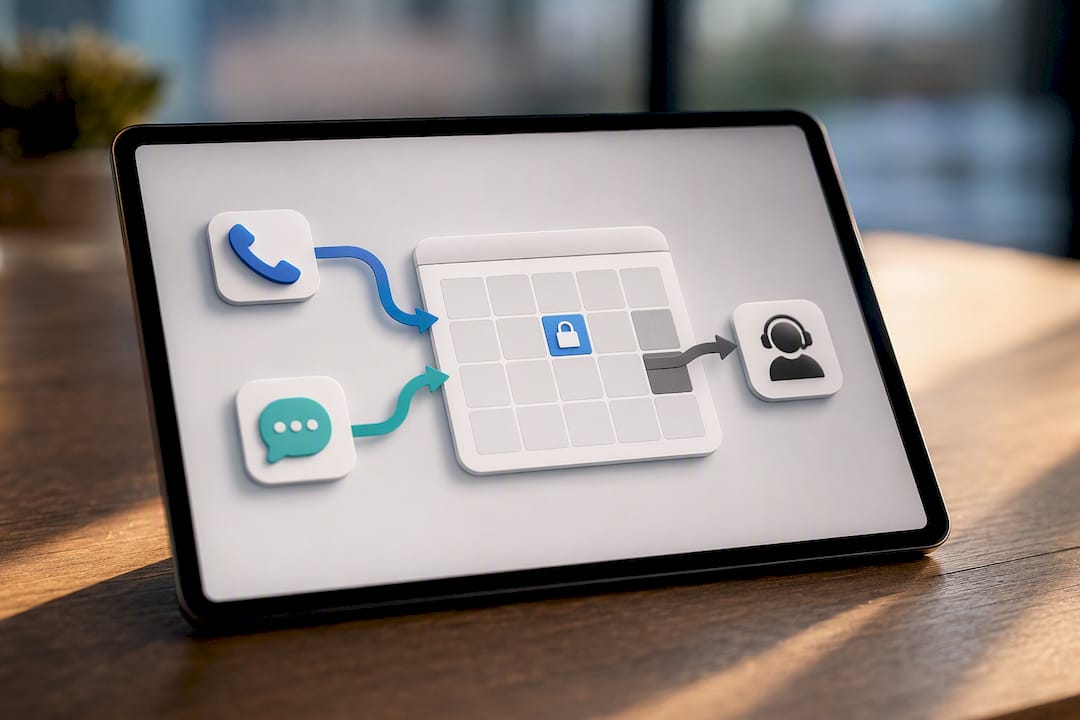
- Slot lock. The system places a temporary hold on that slot so a second caller can’t grab it while the first booking finishes.
- Write-back. The confirmed appointment gets written to the source calendar or practice management system.
- Confirmation and reminders. A text, email, or call confirms the booking and follows up closer to the appointment date.
Slot locking is the detail vendors gloss over and buyers should press on. Without it, two systems reading the same calendar can both think a 2:00 PM slot is open and both book it, creating what schedulers call a “ghost booking.” Direct, live integration with the calendar or EHR (rather than a batch sync every 15 minutes) is what prevents this.
Voice and chat channels need to behave consistently, too. A patient who starts a booking on the phone and finishes by text should see the same real-time availability, not a stale version. Peer-reviewed research on clinical scheduling automation notes that automation improves throughput but still needs a human hand-off path for edge cases, like a patient who needs a referral before scheduling.
Pro Tip: Ask any vendor to demo a double-booking scenario live, not just describe how slot locking works. If they can’t show it, assume it doesn’t exist.
What ROI Should You Expect from AI Scheduling?
The business case is straightforward once you separate marketing claims from what’s actually measurable. Industry case data from scheduling platforms shows AI-driven systems integrated with clinical calendars can cut no-shows by roughly 25 to 30% and increase booked volume through outbound campaigns that convert missed orders into scheduled visits.
The math that matters: if a 10-provider clinic averages 15% no-shows on 200 weekly appointments, a 25% reduction in no-shows recovers roughly 7-8 appointment slots a week, worth real revenue depending on visit type, plus the staff hours no longer spent chasing confirmations by phone.
Treat vendor-cited figures as directional benchmarks, not guarantees. Your actual numbers depend on patient mix, appointment type, and how aggressively reminders are sequenced.
During a pilot, track these four numbers before and after:
- Booked appointments per week, split by channel (phone, chat, web).
- No-show rate, ideally segmented by appointment type.
- Call abandonment rate, which often drops fastest once a voice agent picks up instantly instead of putting callers on hold.
- Staff hours spent on scheduling tasks, tracked honestly for at least two weeks before you automate anything.
Reputation and booking automation reinforce each other. A steady flow of new reviews feeds the same trust signals that get a business chosen in the first place, and pairing that with automated lead follow-up closes the loop between a first inquiry and a booked appointment.
What Integrations and Compliance Checks Should You Require?
Before signing anything, get the integration list and compliance documentation in writing. Vague answers here are the biggest red flag in a vendor evaluation.
Integration endpoints to request:
- Google Calendar and Microsoft 365/Outlook, with two-way sync, not one-way export.
- Major CRM platforms your sales or front-desk team already uses.
- For healthcare specifically, direct EHR integration (Epic and similar systems support this today, letting scheduling agents book straight into the patient record rather than a side spreadsheet).
Compliance and security checklist:
- A signed Business Associate Agreement (BAA) if any patient data touches the system, a baseline HIPAA requirement.
- Encryption at rest and in transit, plus audit logs showing who accessed what and when. Research on clinical AI governance treats audit trails as non-negotiable for safe automation, not a nice-to-have.
- SOC 2 attestation for the vendor’s general security posture, independent of healthcare-specific rules.
- Data residency terms, especially if you operate across state or national lines.
Telephony specifics:
- Number porting support so you keep your existing business line.
- SIP trunk or carrier compatibility if you already run a phone system you don’t want to replace.
- A defined human hand-off flow for calls the AI can’t resolve, so a frustrated caller never gets stuck in a loop.
Pro Tip: Request a sample audit log during the demo, not just a description of one. If the vendor can’t produce a real example, that’s worth noting before you sign.
How Do You Evaluate and Choose an AI Appointment Vendor?
Run the evaluation like a procurement decision, not a sales conversation. Start with a written checklist covering capability, integration depth, compliance, service-level guarantees, reporting, customization, and support responsiveness. Score each vendor against it rather than relying on impressions from a single demo.
Questions worth asking directly in a demo:
- Can you place a live test call or chat session right now, not a scripted walkthrough?
- What happens when the system doesn’t understand a request. Does it escalate cleanly to a human?
- Is API access available for us to build or adjust workflows later, or are we locked into their configuration tools?
- What’s the average onboarding time for a business our size, and what’s held up past deployments?
- Who owns the data if we cancel, and how quickly can we export it?
Red flags include vendors who won’t demo a failure case, who can’t name a specific EHR or CRM they’ve integrated with before, or who quote a flat price with no mention of setup or integration testing time.
A realistic deployment plan runs about 8 to 12 weeks for most organizations, though implementation timelines vary by EHR or CRM complexity:
- Weeks 1-2: Discovery. Map current scheduling rules, staff workflows, and integration requirements.
- Weeks 3-5: Integration. Connect calendars, CRM, or EHR systems and configure booking rules.
- Weeks 6-8: Pilot. Run the system alongside existing processes for one location or department.
- Weeks 9-10: Training. Get front-desk and clinical staff comfortable with hand-off procedures.
- Weeks 11-12: Go-live and optimization. Expand to full volume and start tuning based on early KPI data.
Where Does Service Grower Fit into an Integrated Scheduling Setup?
Local businesses rarely need just a booking tool. They need visibility that gets them found, a way to manage reviews once customers arrive, and a booking flow that actually converts that traffic. Service Grower bundles those pieces: AnswerReady™ websites built to answer customer questions directly in search and AI results, SmartRequest for online booking and request forms, review and reputation management, and GrowthView analytics to track what’s actually working.
The practical benefit is fewer handoffs. A customer who finds a business through an AI search result and books through the same platform doesn’t fall through a gap between marketing and scheduling software, which is where a lot of missed appointments actually happen.
- AnswerReady™ websites designed to surface answers in Google and AI search results, not just rank for keywords.
- SmartRequest booking forms tied directly to the same platform managing visibility and reviews.
- GrowthView reporting that shows bookings and review trends side by side, not in separate dashboards.
Businesses using integrated visibility and booking tools together tend to convert more of their search traffic into actual appointments, because the customer never has to leave the platform that got them there in the first place.
For a single-location business, typical setup runs a few weeks: connecting the booking widget, syncing the calendar, and publishing the AnswerReady™ site. Dentists and similar appointment-based practices tend to see the fastest time-to-value since booking volume and visibility gains compound quickly.
What Do AI Appointment Tools Actually Cost?
Pricing in this category splits into four common shapes, and none of them is universally cheaper. It depends on your call volume and how many locations you’re running.
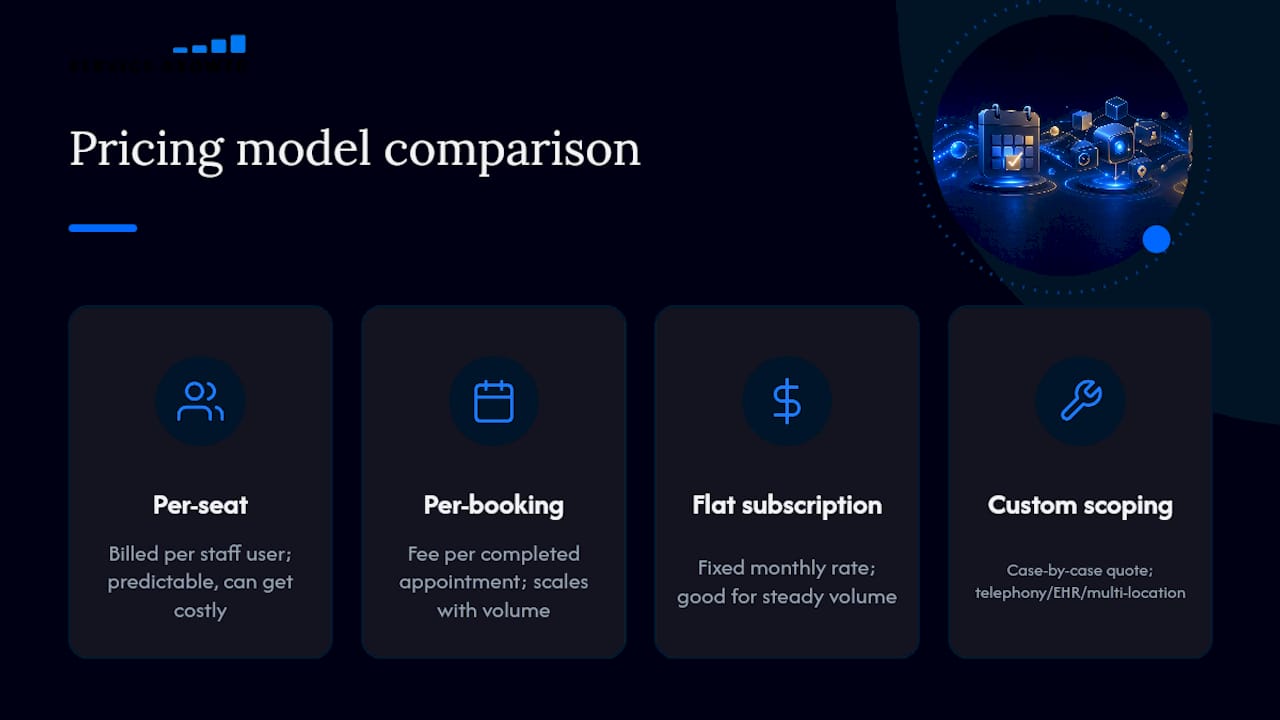
Per-seat pricing charges by staff member using the system, common with AI calendar assistants built for internal teams. It’s predictable but can get expensive fast if every front-desk employee needs a license.
Per-booking pricing charges a fee for each completed appointment, which scales naturally with your business but makes budgeting harder during busy seasons.
Flat subscription pricing charges a fixed monthly rate regardless of volume, typical for embedded widgets and smaller managed platforms. This works best for businesses with steady, predictable booking volume.
Custom scoping applies when a voice agent needs telephony setup, EHR integration, or multi-location deployment. Vendors quote these case by case because setup complexity varies enormously between a single clinic and a ten-location practice group.
Ask every vendor to separate the recurring subscription cost from one-time integration and setup fees. A quote that bundles both into one number makes it hard to compare against a competitor’s pricing later, and it can hide the true cost of switching if you’re not happy after year one. Also ask what happens to pricing as call or booking volume grows. Some per-booking models get punishing at scale, while flat subscriptions start looking like a bargain past a certain volume threshold.
Is Your Patient and Customer Data Actually Protected?
HIPAA gets most of the attention in healthcare scheduling conversations, but it’s not the only compliance bar that matters, and it doesn’t apply at all outside healthcare.
The General Data Protection Regulation (GDPR) applies if you handle appointment data for anyone in the European Union, even if your business is based elsewhere. It requires explicit consent for data collection, a clear retention policy, and the ability to delete a customer’s data on request. A salon booking widget that captures name, phone number, and appointment history is collecting personal data under GDPR’s definition, regardless of industry.
Beyond named regulations, three practical questions apply to every AI appointment system, healthcare or not:
- Where is the data physically stored, and does that location matter for your regulatory obligations?
- Who at the vendor can access customer records, and is that access logged?
- What happens to your data if you cancel the contract? A clean export and deletion process should be spelled out before you sign, not negotiated afterward.
Outbound scheduling campaigns that reach out to customers proactively, common when converting missed appointments or unfulfilled orders into bookings, need accurate identity matching and documented consent. Reaching the wrong person, or contacting someone who opted out, creates both a compliance problem and a trust problem with your customer base. Any vendor running outbound campaigns on your behalf should be able to show you exactly how consent is tracked and honored.
The Real Lesson Behind AI Appointment Adoption
Most coverage of this topic turns into a vendor beauty pageant, ranking tools by feature checklists that barely matter once you’re three weeks into implementation. The category comparison matters more than any single product name, because the wrong category choice (a phone bot for a chat-heavy business, a calendar assistant for a call-heavy clinic) wastes months regardless of how polished the vendor’s demo looked.
The conventional advice to “automate scheduling” undersells the real opportunity. The businesses seeing the biggest gains aren’t just automating a task, they’re connecting visibility, booking, and reputation so a customer’s first search and their first appointment happen inside the same loop. Gartner’s forecast of rapid task-specific AI agent adoption confirms the market is moving fast, but speed alone doesn’t guarantee fit.
Start with your actual bottleneck, not the flashiest demo. If it’s missed calls, fix that first. If it’s a fragmented booking experience, fix that instead. Service Grower built its platform around solving both at once, because for most local businesses, they’re the same problem wearing two different names.
— Service Grower
Get a Clear Picture of Your Current AI Visibility Before You Automate Anything
Before investing in any scheduling system, it’s worth knowing whether customers can actually find your business when they search, since even the best AI appointment tool won’t help if people never reach your booking page. Service Grower runs a Free AI Visibility Check that shows exactly how your business appears across Google and AI-driven search results right now.

If visibility looks solid and booking friction is the real issue, Service Grower’s online booking system for small business connects directly to the same platform managing your reviews and search presence, so leads don’t disappear between “found you” and “booked with you.” Start with the free check, see where the gaps actually are, then decide what to fix first.
Sources
- AI Appointment Scheduling - Automate Bookings - Syllable AI
- PMC article — relevant clinical workflow and AI findings
- Gartner press release — task-specific AI agents forecast